

Only 41% of solo practitioners budgeted for technology, according to the ABA's 2024 Solo and Small Firm TechReport, summarized alongside its membership survey materials. That's a useful way to frame law firm set up. Buying software isn't the starting point. Deciding how you'll protect client funds, screen conflicts, verify deadlines, and supervise technology use comes first.
A lean firm can operate well. But the founder needs written controls, clear ownership, and evidence that the workflow works before accepting a client.
Setup Phases and Timing at a Glance
Setup phases, owners and typical timing
These are editorial planning estimates, not industry benchmarks or promises about agency processing times. Admission, registration, banking, and insurance approvals can extend the schedule.
| Phase | Key tasks | Owner | Typical timing |
|---|---|---|---|
| 1. Foundation | Pick practice areas, jurisdictions, entity type and get an EIN | Founding attorney | Weeks 1–2 |
| 2. Compliance | Bar admission and registration, trust account, malpractice insurance | Founding attorney and bookkeeper | Start after entity choice; finish before accepting affected work or funds |
| 3. Intake | Conflict check workflow, intake form, referral log, response standard | Attorney and intake lead | Weeks 3–5 |
| 4. Systems | Docketing tool, shared calendar, document storage, access rules | Operations lead and IT | After workflow design; before pilot |
| 5. Governance | Technology use policy, vendor review, data retention, breach plan | Attorneys and IT | Alongside systems configuration; approve before pilot |
| 6. Pilot | Test ten sample matters, verify deadlines, train every user | Full team | After configuration; pass before launch |
Copy this table into your project tool. Assign a named owner to every row, even if your name fills several cells.
Foundation decisions shape everything else. Practice scope determines what information intake collects and which courts your docketing system must support. Entity choice establishes the business that will contract with vendors, purchase insurance, and open accounts.
Compliance work can overlap with intake design. Don't confuse submitting an application with receiving approval, though. Record the confirmation document and any outstanding conditions.
Build the controls before adding headcount
A lean launch is normal. The Census Bureau's 2023 County Business Patterns data counted 118,754 of 165,491 U.S. lawyer-office establishments, approximately 71.8%, with fewer than five employees. These are establishment counts, not a census of every independent lawyer.
Small staffing doesn't remove the need for defined responsibilities. An outside bookkeeper can support reconciliation, and an IT provider can configure access, but the founding attorney still needs to approve the operating rules.
Systems and governance should develop together. Configure permissions while drafting the access policy. Build the retention schedule before staff start saving documents wherever they find space.
Launch gate: Governance and pilot testing aren't cleanup tasks. Solo founders should reserve time for both before promising an opening date.
The pilot is your last chance to find broken handoffs without involving a real client. Don't release marketing just because the website is ready.
Pick the Entity, Practice Focus and Jurisdictions
Choose the work before choosing the structure. A local estate-planning practice and a litigation firm handling matters across state lines need different intake questions, document workflows, and staffing arrangements.
Start with a deliberately narrow practice list. You can expand later. At launch, accepting unfamiliar work makes it harder to distinguish an unusual matter from a flawed process.
Entity options for a new law firm
This comparison is a screening tool. State professional-entity rules control what lawyers may form, who may own it, and what liability protection applies.
| Structure | Liability protection | Typical fit | Watch for |
|---|---|---|---|
| Sole proprietorship | Owner carries personal liability for firm debts and claims | Solo practice with no outside owners | Fastest to start, but offers no liability shield |
| Limited liability company (LLC) | Generally shields personal assets from firm debts; lawyers remain liable for their own professional errors | Small firms and multi-attorney offices where permitted | Professional-entity and ownership rules differ by state |
| Professional corporation (PC) | State law sets protection; lawyers remain personally liable for their own errors | Firms using a permitted or required professional corporate form | Confirm whether the state requires a PC or another professional entity |
| Limited liability partnership (LLP) | Can protect partners from certain liabilities arising from other partners' malpractice | Multi-partner firms | Confirm registration, protection, and filing terms under state law |
Make the decisions in a workable order
- Define scope. List up to three intended practice areas and the states where you'll handle matters. Treat this as a launch constraint, not an invitation to accept everything adjacent.
- Confirm professional authority. Check admission, firm registration, ownership, and naming rules with each relevant state bar. Court admission may require a separate review.
- Choose the entity. Match the permitted structure to ownership, tax advice, and risk allocation.
- File formation documents. Use the secretary of state's current requirements, alongside any professional approvals.
- Obtain an EIN. Complete the federal tax-identification step through the IRS.
- Prepare employer accounts. Establish applicable state tax and payroll registrations before hiring.
Don't select an entity solely because someone says it saves tax. Ask your accountant to explain the ongoing payroll, filing, and administration costs.
For founders sharing ownership, Five Star Placements' discussion of equity partnership models for law firms offers useful context for compensation and ownership conversations. Put capital contributions, voting, departures, and client-transition responsibilities into the partnership documents.
Confirm current fees on official state sites rather than budgeting from an old checklist. And test whether a single permitted entity with appropriately admitted attorneys could support your geographic plan. It may be simpler than maintaining separate entities and offices, subject to each jurisdiction's requirements.
Trust Accounts, Insurance and Licensing Basics
Separate permission to practise from permission to handle money. An active law license doesn't tell you which trust account arrangements your firm needs or how its records must be maintained.
Before accepting client funds, determine whether those funds belong in trust. Open the appropriate account before receiving money that must be held there. Confirm account eligibility, required designations, interest treatment, and reporting obligations with the relevant state bar.
Put money handling in writing
Give the bookkeeper a procedure, not just banking credentials. It should identify who can receive funds, authorize transfers, review statements, and investigate discrepancies.
- Separate balances. Keep client funds apart from operating money and maintain individual client ledgers.
- Control disbursements. Document the purpose and authorization for payments. Don't assume a deposited check has cleared merely because the bank displays an available balance.
- Reconcile consistently. Set a fixed schedule that satisfies governing rules. Compare the bank balance, trust-account records, and client ledgers.
- Escalate discrepancies. Stop questionable transfers and assign an attorney to investigate unexplained differences.
A bookkeeper can prepare records. The responsible lawyer still needs to review them and preserve evidence of that review.
Bind coverage before giving advice
Arrange malpractice coverage before the first consultation as a launch standard. A consultation can involve legal advice even when the prospect never signs an engagement letter.
Ask the carrier about prior acts, exclusions, reporting duties, deductibles, and work performed before the policy begins. Also examine cyber coverage. Check whether incident response, forensic investigation, notification support, and funds-transfer losses are included or require separate protection.
Insurance isn't a substitute for a working control. It's a contract with conditions you need to understand before a problem occurs.
Maintain a licensing register for each attorney. Track active admission, court admissions, renewal obligations, and any limits on the work they may undertake. Verify firm-name filings, local business-license requirements, the EIN, and applicable state tax registrations.
For example, a firm with a Texas-admitted lawyer and a Florida-admitted lawyer needs jurisdiction-specific checks for assignments and trust arrangements. Don't assume either lawyer can appear everywhere the firm advertises. Confirm the current position directly with the State Bar of Texas and The Florida Bar before relying on it.
Build a Client Intake and Conflict Process
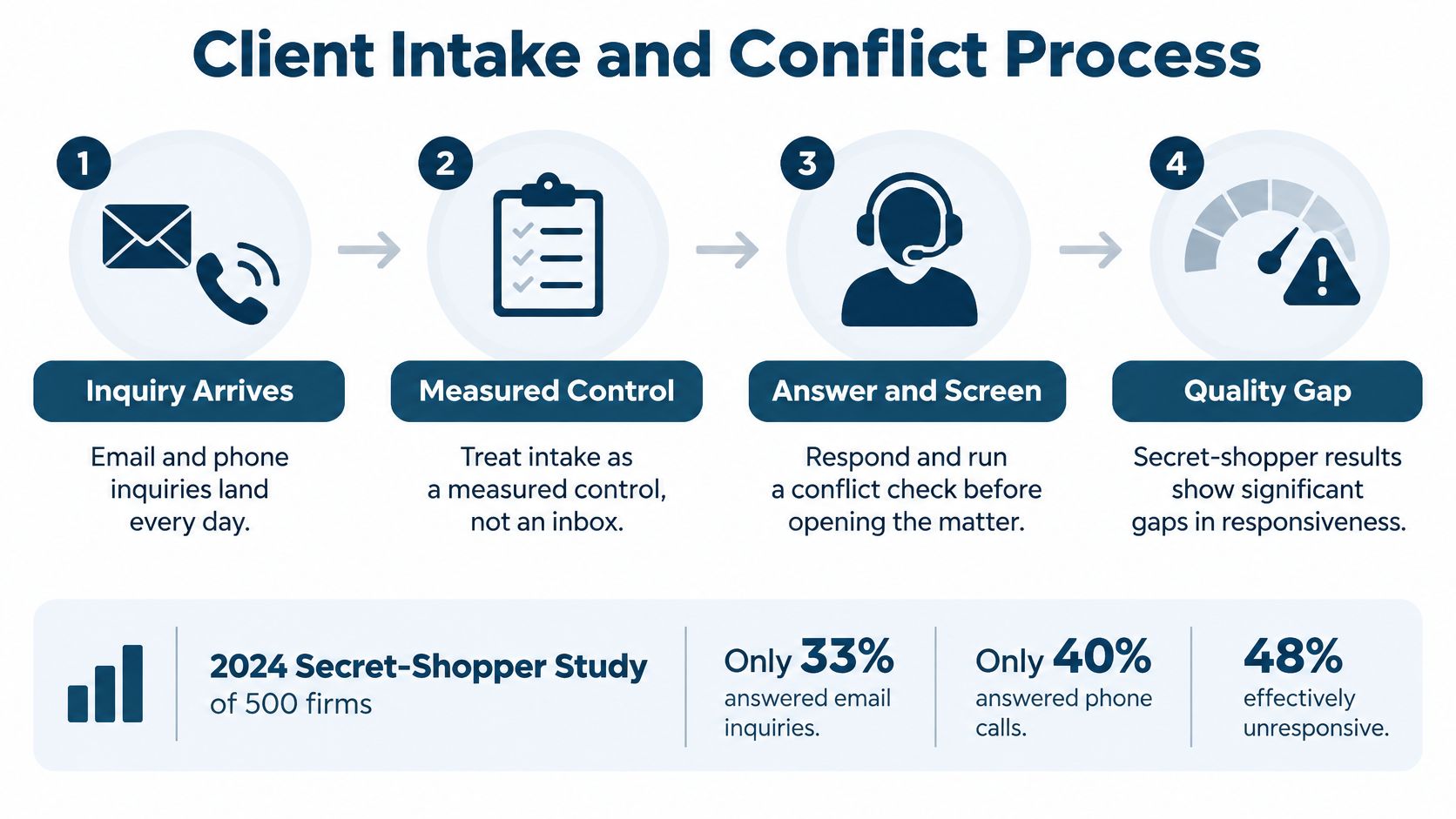
Intake is a measured operating control, not a shared inbox. In a 2024 secret-shopper study of 500 firms, described in Clio's client-intake guide, only 33% responded to email inquiries, 40% answered phone calls, and 48% were effectively unreachable by phone.
Those are study benchmarks, not a forecast for your firm. They do show why buying advertising before establishing response ownership is a poor trade.
Build the handoff before the campaign
- Define eligible work. Specify practice areas and jurisdictions, including matters the firm won't accept. Give the intake person a route for uncertain cases.
- Screen conflicts before substantive consultation. Establish how staff search clients, former clients, adverse parties, and relevant related entities. An attorney should resolve possible matches rather than leaving staff to guess.
- Capture useful information. Record prospect identity, adverse parties, matter type, urgency, referral source, and consent status. Ask for enough information to screen the inquiry without inviting an unnecessary upload of sensitive material.
- Assign an attorney. Route qualified leads to a named lawyer within a written response standard. Specify who covers absences and who handles urgent deadlines.
- Acknowledge receipt the same day. Explain what happens next and warn prospects not to assume the firm has accepted representation. An automated acknowledgement isn't a substitute for attorney review.
- Close the loop. Record each engagement or decline reason and send appropriate documentation. Don't leave a declined prospect believing someone is protecting a filing date.
When considering automated reception, use Heyline's discussion of Heyline AI intake and booking to frame questions about information collection and booking. Keep legal advice, conflict decisions, and acceptance of representation under attorney control.
Measure what happens after the inquiry
Use a workflow map to identify each handoff, decision, and missing-information route. A practical guide to creating a workflow can help turn that map into assigned tasks.
Review conversion, response time, and revenue by referral source monthly. For an initial planning exercise, use the first thirty to sixty days to establish your own baseline rather than setting targets from another firm's results.
Separate prospects who weren't suitable from prospects the firm failed to reach. Those problems require different fixes. One calls for better targeting; the other calls for better coverage.
Set Up Deadline Tracking Across Courts
Docket monitoring and deadline calculation are different jobs. Monitoring identifies a filing or docket change. Calculation applies a governing rule to a verified triggering event.
The federal electronic-filing system sends a Notice of Electronic Filing after a filing, with access to the document and docket sheet, as explained in the PACER User Manual. Receiving that email doesn't prove someone saved the document, reviewed the event, or entered the resulting deadline.
Route each notice to the responsible attorney the same day under your internal procedure. Preserve the notice and assign a review task against the correct matter.

Verify the trigger before counting
Under Federal Rule of Civil Procedure 6, the triggering day is excluded, intermediate days include weekends and legal holidays, and a final day falling on a weekend or legal holiday generally moves to the next qualifying day. For example, a period ending on Saturday would move to Monday only if Monday isn't itself a legal holiday.
That distinction matters. A reminder can faithfully display an incorrect date if someone chose the wrong trigger or applied the wrong rule.
Use this operating procedure:
- Require the source information. Matter templates should capture jurisdiction, court, trigger date, event type, and the supporting notice or order. Don't let staff calculate from an unexplained date.
- Apply the governing rule. Check the applicable rule, local requirements, court order, service method, and holiday calendar. Record exceptions rather than forcing them into a generic formula.
- Independently verify critical dates. Have another qualified person check the trigger and calculation. A solo founder should arrange a suitable independent review process.
- Publish controlled calendar entries. Assign a responsible attorney and backup, then distribute dates to the shared calendar. Keep the source and verification record with the matter.
- Escalate unfinished work. An overdue reminder needs a named recipient and a required response. Document completion or the reason for changing the date.
An automated docketing workflow should preserve those distinctions rather than treating every court email as a finished calendar entry.
Budget for retrieval separately
PACER's official pricing terms state a standard charge of $0.10 per page, generally cap a single document or case-specific docket report at $3.00, and waive billing when quarterly charges total $30 or less. Search results and certain other categories don't receive the same document cap.
Track access by user and matter. Separate broad searches from case-specific retrieval so the bookkeeper can allocate charges correctly.
For multi-jurisdiction work, maintain a court matrix showing who monitors notices, who verifies dates, and who covers absences. Test changed orders and attorney reassignment as well as ordinary filings. A system that works only while its original operator is present isn't ready for expansion.
Put Technology Rules in Place Before Go Live
Buying a legal application doesn't establish a technology policy. Staff can still paste confidential text into an unapproved tool, share an unrestricted folder, or retain a former employee's access.
The ABA's discussion of the 2025 Legal Industry Report reports that 31% of legal professionals personally used generative AI at work, while 21% of firms reported adopting it. Those figures describe different measures, but they give founders a reason to address individual tool use explicitly.
Write rules people can follow
Keep the policy short enough to use during an actual task. Cover the following decisions:
- Approved tools. Name permitted applications, prohibited uses, and who can approve an exception.
- Client information. Specify what information may enter an AI tool and which contractual or technical safeguards must be checked first.
- Human review. Require attorney verification of AI-generated legal analysis, citations, drafts, and calculations before reliance or release.
- Cloud arrangements. Document confidentiality terms, data location, subprocessors, export options, and deletion procedures.
- Vendor access. Limit support access, record approvals, and revoke access when work ends.
- Remote devices. Require approved devices, encryption, updates, screen locks, and a process for lost equipment.
- Retention. Assign record categories and retention periods based on applicable duties, client agreements, and preservation holds.
- Incident response. Identify who contains an incident, preserves evidence, obtains advice, and evaluates notification obligations.
- Client disclosure. Set an attorney-review process for deciding when tool use requires explanation, consent, or contractual treatment.
Messaging belongs in that policy too. Ciphar's guide to secure messaging for sensitive legal matters provides context for evaluating communications, but the firm must decide which channels staff and clients may use.
Enforce the policy through configuration
Use ethical walls to restrict matters to approved users. Apply role-based access and document permissions rather than giving every employee the same access. Enable logs that let an authorized reviewer investigate access and changes.
A broader review of technology in the law office is useful when comparing systems, but test the actual configuration. Ask a test user to open a restricted matter and record whether the system blocks access.
Practical rule: A policy without an owner, enforcement setting, or review record is only a statement of intent.
Answer confidentiality and security questions in writing. You can replace a tool later. The approved rules and evidence of supervision need to exist before client work begins.
Confirm Your Launch Before Taking the First Client
The launch decision should be go or no-go, not mostly ready. Unfinished branding can wait. Unverified money handling, permissions, and deadlines can't.
Keep a launch register showing each test, the expected result, the actual result, the reviewer, and any corrective action. Attach evidence rather than marking an item complete from memory.
Run a controlled acceptance test
Use this proposed pilot checklist:
- Confirm compliance. Verify the trust account is ready where needed, malpractice coverage is bound, and every assigned attorney has the required active admission.
- Test ten leads. Send sample inquiries through every intake channel. Check response handling, conflict escalation, referral recording, and engagement or decline documentation.
- Test three closed matters. Recalculate the relevant deadlines by hand and compare them with system output. Use anonymized or appropriately authorized material.
- Check the difficult cases. Include a changed court order, an absent attorney, and a notice assigned to the wrong matter.
- Train every user. Require each person to demonstrate their assigned workflow and sign the technology policy.
- Record the decision. Resolve failed tests, repeat them, and retain approval before opening live matters.
The pilot quantities are a recommended exercise, not an industry standard. If a test fails, investigate the cause instead of changing the expected result to match the software.
For solo and small firms, MatterAlert is one option to evaluate for repeatable matter templates, shared calendars, and reminders without desktop software. Our dedicated team provides initial onboarding, user training, ongoing support, and optimization.
Verify the fit with your actual courts
Bring your jurisdiction list and sample workflows to the demo. Our docket availability and rule coverage vary by court and jurisdiction, especially in Canada, so confirm the specific courts and rule sets before committing.
Also establish who approves configuration changes after launch. A new practice area, staff departure, or unfamiliar court should trigger a controlled review, not an improvised workaround.
Open the firm when the tests pass and the evidence is recorded. That gives the founder something more useful than confidence: a repeatable operating process.
MatterAlert offers matter templates, shared calendars, reminders, and centralized docketing workflows to support a controlled law firm launch. Visit MatterAlert to arrange a demo using your courts and sample matters, and discuss onboarding and training before choosing your setup.