







1
Create Your Matter
Set up matters using customizable templates for different types – litigation, IP, family law, or client-specific. Templates automate task, event, and document creation.
 SOC 2 Compliant • Trusted by Law Firms Across North America
MatterAlert is a powerful matter-centric docketing, calendaring, and tickler system that helps legal teams manage all matter-related information seamlessly in one web-based platform.

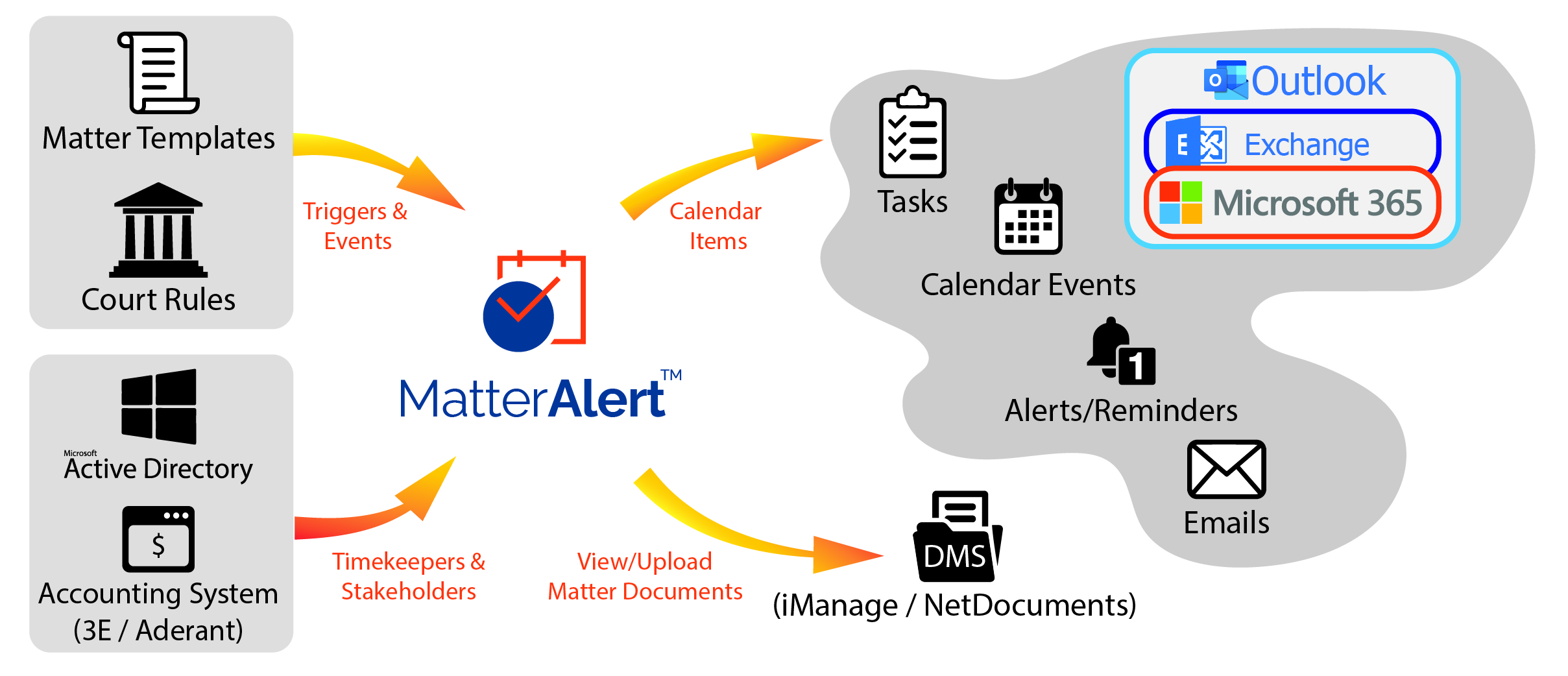
Integrates With Industry-Leading Platforms
SOC 2 CompliantMatterAlert is a modern, web-based docketing, calendaring, and tickler system designed to help law firms efficiently manage all matter-related information in one centralized platform.
From automatic court rule-based calendar event creation covering all 50 U.S. states and select Canadian jurisdictions, to docket tracking via PACER and UniCourt, MatterAlert ensures your entire legal team stays synchronized and informed.
A short walkthrough of matter-centric docketing, court rules, and calendar synchronization.
MatterAlert is web-based with zero installations needed. Typical implementation takes 4–6 weeks including data conversion, training, and pilot rollout.
Set up matters using customizable templates for different types – litigation, IP, family law, or client-specific. Templates automate task, event, and document creation.
MatterAlert connects to CalendarRules to automatically generate calendar events, reminders, and deadlines based on 2,200+ court rule sets across the US and Canada.
Use integrated UniCourt and PACER connections to find live court dockets, case information, and documents. Add cases directly within MatterAlert.
All events, tasks, and deadlines sync automatically to Outlook within one minute. Multi-channel notifications ensure no one ever misses a critical date.
MatterAlert connects to CalendarRules for more than 2,200 court rule sets spanning all 50 U.S. states and select Canadian jurisdictions. When a matter is set up, applicable rule-based events and deadlines can be generated from trigger dates, with weekend and holiday adjustments.
Rules-based deadline calculation comes from CalendarRules. Separately, PACER and UniCourt connections help teams monitor case dockets and notices. Docket availability and rule coverage vary by court and jurisdiction, especially in Canada; confirm the specific courts and rule sets your firm needs during a demo. Changes to deadlines can then be shared through Outlook synchronization and notifications.
The right choice depends on whether your team primarily needs rule-based calendaring, court-notice processing, or a broader matter-centered workflow. These are differences in published product emphasis, not a feature-by-feature verdict.
Combines CalendarRules deadline calculation, PACER and UniCourt docket access, matter templates, tasks, audit logs, and Outlook synchronization in one matter-centered platform.
Emphasize electronic court filing notice processing, case monitoring, and document retrieval. Compare those notice workflows with MatterAlert’s rules-based calendaring and matter management.
MatterAlert is designed for legal teams managing matters, court dates, and shared calendars. Litigation teams tracking dockets, as well as IP, family law, and client-specific practices using matter templates, can evaluate it against their own court coverage and workflow needs.
Consider MatterAlert when a lean team needs repeatable matter templates, shared calendars, and reminders without desktop software. As the firm grows, centralized matter views and delegation help distribute deadlines across staff. Confirm the courts and rules you use before adopting a workflow.
Evaluate centralized matter views, delegation, bulk reassignment, ethical walls, audit logs, and integrations with your accounting and document systems across offices and practice groups.
For in-house teams tracking outside matters and deadlines, review whether MatterAlert’s matter-based workflows and Microsoft 365 synchronization fit your existing processes.
The best fit depends on your courts, practice areas, and existing systems. MatterAlert is an option for firms that want CalendarRules-powered deadline calculation from 2,200+ rule sets across all 50 U.S. states and select Canadian jurisdictions, alongside matter management, Outlook synchronization, and PACER and UniCourt docket connections. Confirm the specific courts, rules, and docket sources you need in a demo.
MatterAlert integrates with CalendarRules for rule-based deadlines across all 50 U.S. states and select Canadian jurisdictions, not every Canadian court. Trigger-date calculations account for weekends and holidays. Coverage depends on the relevant rule set, so verify your courts before relying on an automated date.
CalendarRules calculates rule-based deadlines; PACER and UniCourt provide separate case docket and notice access. MatterAlert organizes events by matter and synchronizes changes to Outlook calendars, with reminders for the legal team. A new docket entry should not be assumed to create every applicable deadline automatically – review the court notice and applicable rule set.
Solo and small firms can evaluate templates and shared calendars; mid-size and large firms can evaluate cross-office reassignment, access controls, and audit logs. Litigation teams may value docket access, while IP and family law teams can use practice-specific templates. Corporate legal teams should confirm that matter workflows fit their needs. Suitability depends on your courts and integrations.
Rule-based date calculations, calendar synchronization, notifications, task escalation, and event-level audit logs help reduce manual handoffs and provide a record of changes. SOC 2 controls and access restrictions help protect matter information. These safeguards support, but do not replace, independent deadline verification and professional supervision.
MatterAlert is backed by a dedicated team committed to your long-term success. From initial onboarding and user training to ongoing support and optimization, we partner with your firm to ensure you realize the full value of the platform. Clients have access to our support portal at https://support.paayatech.com, where they can explore our comprehensive knowledge base, access product documentation and training resources, and submit support requests directly to our team. Our goal is to provide responsive, knowledgeable assistance whenever you need it.
MatterAlert integrates with iManage and NetDocuments. The iManage integration displays workspaces, links documents to events/tasks, and honors both workspace-level and document-level permissions.
MatterAlert integrates with Thomson Reuters ELITE 3E and Aderant out of the box. Matter, client, timekeeper, and ethical wall information is imported automatically via nightly sync, with same-day search and import also available.
MatterAlert connects directly to Microsoft 365 and Exchange Server (2010+) without requiring web add-ins. Changes sync from MatterAlert to Outlook within one minute. It works with New Outlook, OWA, and Outlook mobile.
Yes. Through UniCourt and PACER integration, users can search cases by name, docket number, jurisdiction, or dates across all U.S. federal courts plus 40+ state courts and Canadian jurisdictions.
CalendarRules tracks critical trigger dates for courts across North America with 2,200+ rule sets. Rules auto-calculate deadlines with weekend/holiday adjustments. When a court updates its rules, your calendar events update automatically.
Typical implementation takes 4-6 weeks including integration configuration, data conversion with 2-3 validation runs, Train-the-Trainer sessions, and pilot rollout. PaayaTech provides a dedicated project manager and 90 days of enhanced post-launch support.
No. Users who only receive Outlook calendar invites from MatterAlert do not need a separate license. Licensing is required only for users who access the MatterAlert application directly.
When an attorney departs, a docketing manager can reassign all events, appointments, and tasks to a new attorney across one or multiple matters with just a few clicks. Changes automatically sync to all subscriber calendars.
See how MatterAlert helps firms eliminate missed deadlines, streamline matter management, and keep the entire team in sync. Book a personalized demo today.
In short – everything your firm needs to stay ahead of every critical date:
Ask MatterAlert
Website assistant