

North Carolina's District Courts logged 1,849,747 cases filed and 2,119,023 cases disposed in fiscal year 2024–25, according to trial court data submitted to the General Assembly. That volume gives context to a practical problem: finding a calendar entry is only the first step in identifying when and where a client must appear.
The Court Dates search at nccourts.gov/court-dates provides a starting point for locating a scheduled date. Finding a matching entry, however, does not establish that its details remain current. A continued hearing or changed courtroom can leave a client in the wrong place on the wrong morning.
A calendar hit is a lead, not a confirmed hearing.
For docketing staff, that distinction separates locating an entry from relying on it. A search result shows a recorded date; it does not, by itself, confirm that the hearing is still on, the courtroom is unchanged, or the judge has not reset the matter. Verify the current status and appearance details before anyone acts on the date.
Where to Find Each North Carolina Court Calendar
Many users open the wrong schedule first. The Judicial Branch publishes several distinct schedule types, and each answers a different question. The Judicial Branch's legal community page separates them into county-level civil and criminal calendars, local administrative schedules for district and superior courts, the statewide Superior Court Master Calendar, Business Court calendars, and Court of Appeals oral-argument calendars. A docketing system that flattens these into one feed will eventually log an administrative setting as a real appearance.
Before opening any calendar, write down two things: the court level and the county. That pair decides which source you open first. If the level is unclear from the file, read the case paperwork. Don't guess between District Court and Superior Court, because the calendars don't overlap and a wrong guess burns a day.
Start with the Court Dates search when you know the venue and want a scheduled date. It supports lookup by name, by county, and by date range, which covers three different starting points. County civil and criminal calendars show upcoming schedules for that county, useful before a session. Local administrative schedules carry district and superior court administrative settings, the kind of entry that moves. The Portal searches by case number, party, attorney, and courtroom, and it's the sharper tool once you have an identifier.
| Source | What It Covers | Search By | Best Used For |
|---|---|---|---|
| Court Dates search | Scheduled court dates statewide | Name, county, date range | Finding a hearing when the case venue is known |
| County civil and criminal calendars | Upcoming civil and criminal schedules by county | County and date | Checking a county docket before a session |
| Local administrative schedules | District and superior court administrative settings | County and court level | Confirming local scheduling practice |
| Superior Court Master Calendar | Statewide superior court master schedule | County and court level | Cross-checking a superior court setting |
| Business Court calendars | Business Court matters | Case number or party name | Tracking business case dates |
| Court of Appeals oral-argument calendars | Appellate oral argument sessions | Argument session or case number | Confirming an appellate argument date |
| Portal | Case records and related schedule information | Case number, party, attorney, courtroom | Narrowing a result to one case |
Every calendar record your team keeps should carry at least nine fields: jurisdiction, county, court level, calendar type, case identifier, hearing date and time, courtroom or location, judge or judicial officer where the source gives one, and a source timestamp. Store the originating calendar category too. When a court notice or amended calendar conflicts with a previously captured event, staff validation should be required rather than optional.
Say a county criminal calendar shows a hearing at 9:30 a.m. and the local administrative schedule shows the same case as a setting. Those are two different statements. One is an appearance; the other may still be in motion. Keeping them in separate records with separate timestamps is the only way to spot the difference later.
For families coordinating around a hearing date, scheduling around the court's calendar takes planning, so it helps to set up a family law consultation once the date is confirmed rather than before. The next sections cover the search steps and the verification that follows.
How to Search a Court Date Step by Step
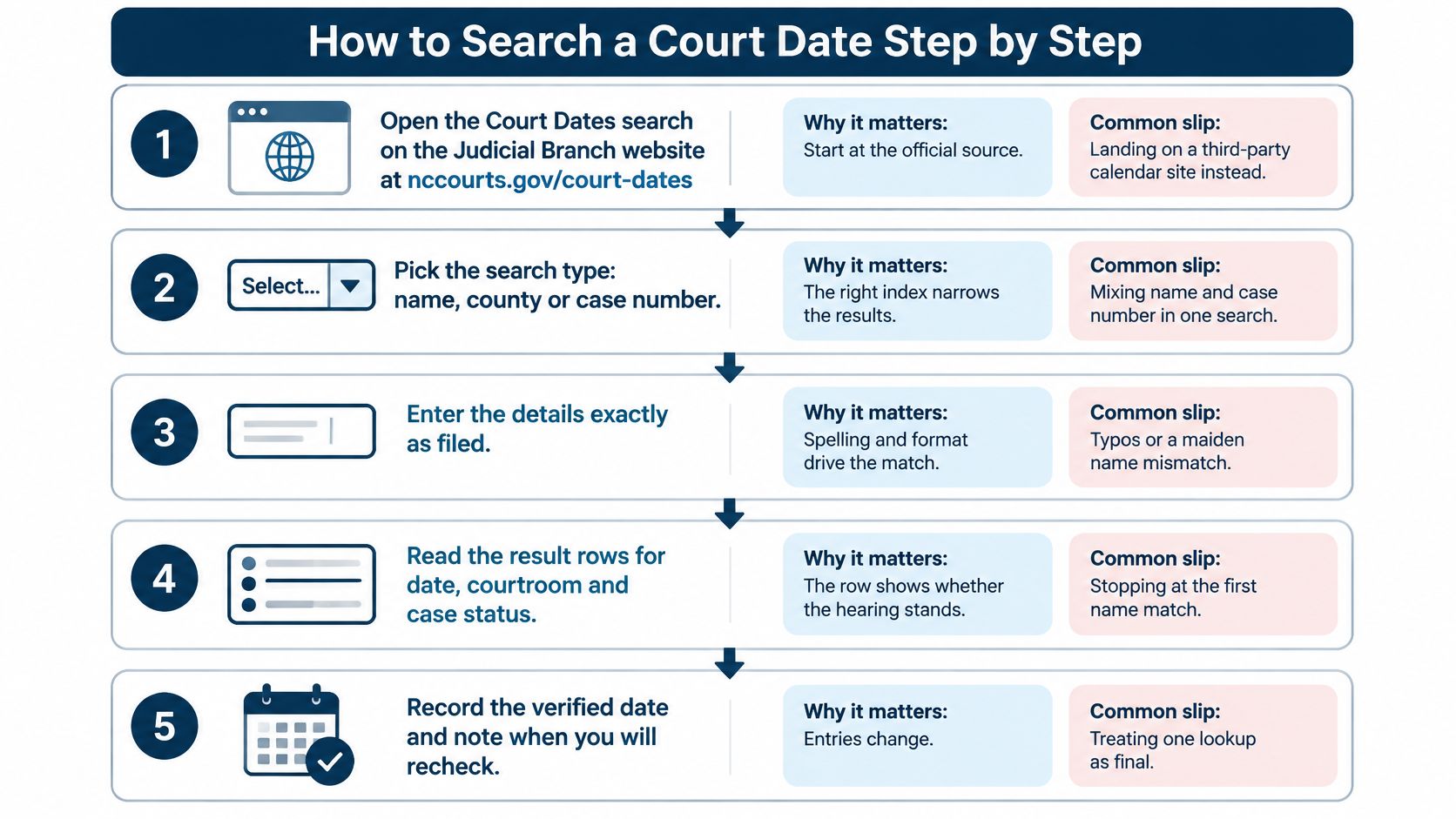
The steps, in order
1. Open the official search. Go to nccourts.gov/court-dates. The common slip is landing on a third-party calendar aggregator that scrapes court data and lags behind the source by days.
2. Choose your search type. Name, county, or date range. Use a name search when all you have is a party; use county plus date range when you know the venue. Mixing the two in one pass produces noise.
3. Enter the name the way the court filed it. A middle initial, a hyphenated surname, or a company suffix like LLC can hide a match. The slip here is a maiden name or a "Jr." that the docket dropped.
4. Widen the date range. Set it to cover the session plus a few days on either side, since listings shift. Searching a single day is the most common reason a real hearing appears missing.
5. Read the row, not just the name. Pull the court level, calendar type, courtroom, judge, and time. Stopping at the first name match is how two defendants with similar names get swapped in a file.
6. Switch to the Portal when you have a case number. A case-number search is more precise than a name search, and it pulls the record rather than the calendar row. A disciplined legal docket search pays off because the identifier survives name changes and consolidations.
7. Compare against the county calendar. Open the civil or criminal calendar for that county and date and check that the entry appears in both places. A result that shows up in one source only is a lead, not a confirmation.
8. Record what you found and when. Log the case identifier, the source, and the exact time you checked. The timestamp is what makes a later conflict resolvable.
What a complete result looks like
A finished search returns four things that agree with each other: a case identifier, a date and time, a courtroom, and a source that matches the county calendar for the same day. If any of those is missing, the entry isn't done.
Practical rule: a result with no courtroom is not a failure of the search. It's a signal that the hearing needs verification before you tell a client where to go.
Most incomplete entries come from one of two places. Either the calendar hasn't been published yet for that session, or the case was reset and only one of the two sources has caught up. Both are resolved the same way, by rechecking the county calendar and, if the gap persists, calling the clerk.
Keep the search output as a screenshot or PDF alongside the matter. A timestamped capture settles arguments about what the docket said on a given afternoon, and it takes ten seconds.
Reading Each Calendar Entry
Reading an entry is a sequence, not a glance. Go in this order and the entry tells you how much to trust it.
Court level first. A District Court setting and a Superior Court setting can look nearly identical in a list of rows. They aren't interchangeable, and they route to different clerks when something goes wrong.
Then the calendar type. This is the field that decides how much weight the entry carries. A county criminal calendar row represents a scheduled hearing. A local administrative schedule may represent a setting that is still moving. Same case, different authority.
Then the date and time. Check whether the time is local to the courthouse, which matters for anyone reading the entry from another time zone. A 9:30 a.m. Wake County setting isn't 9:30 a.m. for a paralegal working from Denver.
Then the courtroom or location. A blank courtroom is not proof of a fake entry. It is a reason to verify before anyone prepares a travel plan or prints directions.
Then the judge or judicial officer, where the source provides one. Knowing the presiding judge helps when a continuance request has to be directed correctly, and it flags cases where the assignment has changed.
Then the source timestamp. An entry captured last week carries less weight than one captured this morning. Courts move dates, and the timestamp is the only field that tells you which version you're holding.
Mark any field the source doesn't show with a dash. Never fill a gap with an assumption, because a guess in a calendar record becomes a fact in someone's preparation.
Here's how that plays out. An entry shows District Court, Wake County, a 9:30 a.m. setting, and a blank courtroom. Log the location as unconfirmed, flag it, and recheck before the client is told where to appear. Keep the case identifier beside every field so the record can be matched to the file later, and to the next search result.
One test covers the whole exercise. If the entry can't answer where, when, who, and from which source, treat it as a lead. Not an instruction.
Confirming Whether a Hearing Is Still On
The assumption worth challenging is simple: that a found date is a confirmed date. It isn't. The Judicial Branch publishes county civil and criminal calendars, Portal searches by case number, party, attorney, and courtroom, and local administrative schedules, but its public guidance doesn't spell out how to reconcile conflicting calendar sources, catch a last-minute continuance, or confirm whether a hearing is remote, in person, or assigned to a specific courtroom. That gap sits between the Court Dates search and an actual attendance instruction.
The Eastern District of North Carolina makes the point by contrast. Its federal schedule is updated every 20 minutes during weekday business hours. Court scheduling is dynamic by design, not a monthly lookup.
A verification workflow that holds up
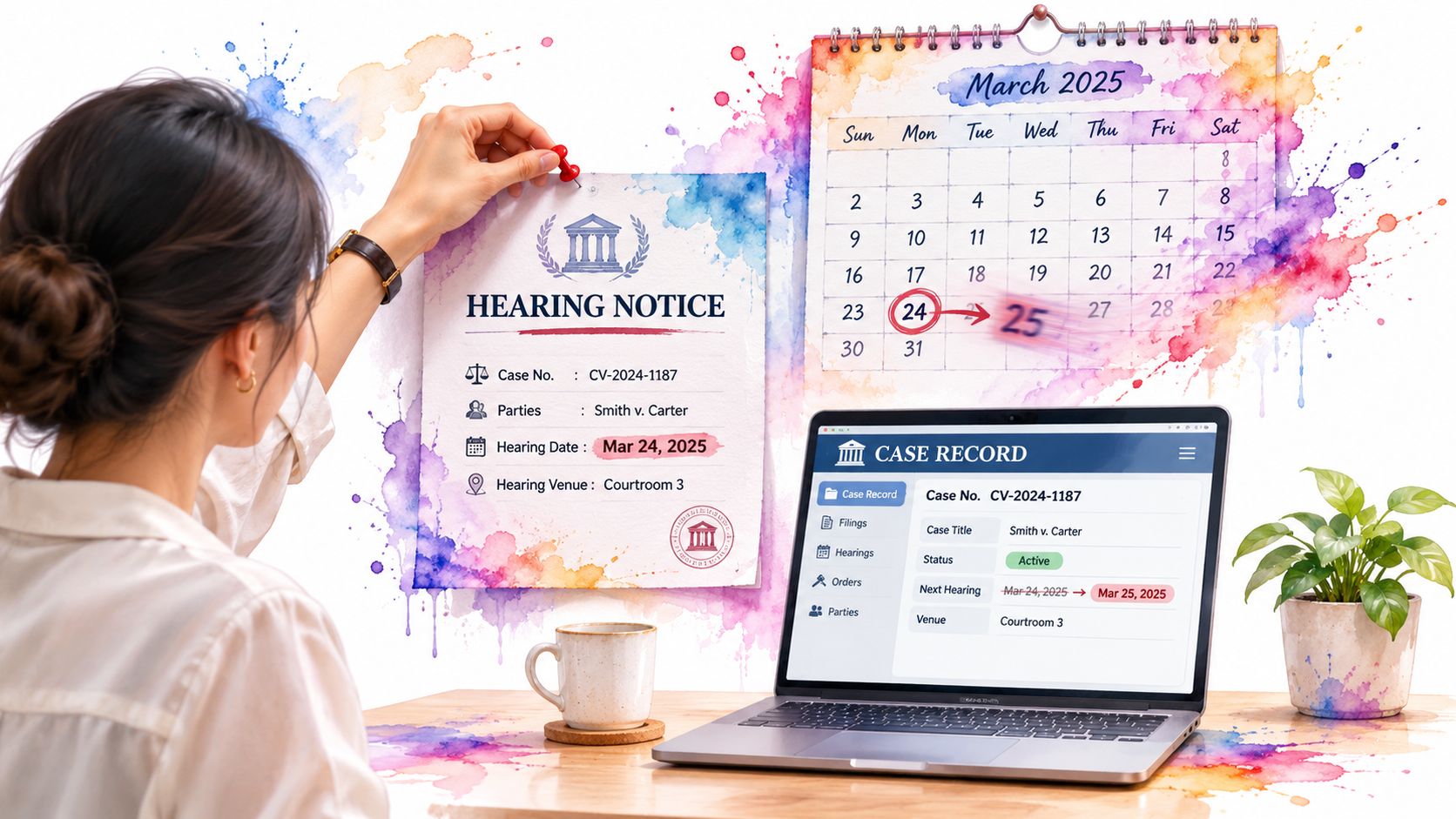
- Capture the source and timestamp of the first result. Note which source it came from, not just what it said.
- Recheck on the day the case is set. Open the Court Dates search and the county calendar again, in that order.
- Look for a conflict. An amended calendar or a local administrative notice that contradicts the first result outranks it until someone resolves the difference.
- Confirm the format. Remote or in person, and which courtroom applies. A hearing can be live and still be in the wrong room.
- Call or email the clerk for high-risk matters. Record the name of the person who confirmed the date and the time of the call.
- Recheck the business day before. Last-minute changes cluster in the final 24 hours.
The question isn't "how do I search by name." It's "what is the authoritative status of this hearing right now."
Multi-jurisdiction work raises the risk. A firm handling state superior court matters, county district calendars, and federal dockets is reading three update practices at once, and a schedule that refreshes hourly on one system may sit stale for days on another. Document the workflow so the check doesn't depend on who happens to be at the desk.
Continuance Rules Civil and Criminal Cases Follow
| Rule | Civil Cases | Criminal Cases |
|---|---|---|
| Calendar publication | At least five business days before the session | Not set in the criminal continuance policy; the first trial setting is the anchor |
| Hearing order | Matters presumed heard in the listed order | Cases resolved as early as possible, including at the first trial setting |
| Continuance by agreement | Needs both parties' consent or compelling reasons, subject to judge approval | Prosecutor and defendant may agree up to three times without court approval |
| New date limit | More than one week later, except uncontested and domestic-violence matters | No later than 120 days after the initial court date |
| Timing target | 90% resolved within 12 months and all within 24 months after filing | Resolve as early as possible; requests more than 90 days after first calendaring need extraordinary cause |
| Who decides | Presiding district judge or designee on written motion | Presiding judge for written requests after the third agreed continuance or beyond 120 days |
| Reschedule target | Specific trial date set after input from all parties | Within 30 days after the original date when possible |
Why the civil rules behave the way they do
The local civil calendaring rules build in four separate controls: publication timing, hearing order, permitted reasons for delay, and judicial approval. Civil calendars must be published at least five business days before the court session, and matters are presumed to be heard in the order listed. A continuance generally needs both parties' consent or compelling reasons, and even an agreed continuance stays subject to Rule 7 and the presiding judge's discretion.
The reschedule rule is where teams slip. Except for uncontested and domestic-violence matters, a continued civil case should land on a date more than one week later. Not the next day, not the same week.
The criminal side counts days
Criminal cases should be resolved as early as possible, including at the first trial setting, according to the state's criminal continuance policy. Good cause requires a compelling reason that affects fundamental trial fairness. A request made more than 90 days after the case was first calendared before a judge should be granted only for extraordinary cause, and a request made on the scheduled court date goes to the presiding trial judge.
Agreement has a ceiling. Under the criminal district court continuance rule, the prosecutor and the defendant, through counsel or directly when self-represented, may continue a case by agreement without court approval no more than three times. Each new date must fall no later than 120 days after the initial court date. After the third agreed continuance, or when the proposed date lands beyond 120 days, the request must be written and presented to the presiding judge. Whenever possible, the rescheduled event should occur within 30 days of the date it was continued from.
Civil case management carries its own clock. General civil and magistrate appeal cases should be resolved within 24 months after filing, with 90% resolved within 12 months, per the civil case management rule. Continuance requests go by written motion to the district judge presiding over the session or the judge's designee, and a granted continuance should produce a specific trial date after input from all parties.
Practically, that means your docket record needs four things: the first calendar date, a running count of elapsed days, a log of prior continuances with dates, and a copy of any written request. Without the first calendar date, nobody can tell whether the 90-day threshold has passed.
Holiday and Emergency Closures That Shift Dates
Closures do two jobs at once. They move appearances, and they change how a deadline is counted. The Judicial Branch publishes observance dates by year and separately points users to court closings and advisories on its holiday schedule, and the published list includes Good Friday, Memorial Day, the Independence Day observance, Thanksgiving closures, and multiple Christmas observance days.
The trap is treating that list as a standard federal holiday calendar. It isn't. North Carolina's court observances can include substitute dates and multi-day closures. Independence Day is observed on July 3 in 2026, and the Christmas period includes closures on December 24, 25, and 28. A rules engine built on "the third Monday in January" logic will miss both.
A method for handling closures
- Pull the holiday schedule for the court year before you calculate anything that spans a holiday.
- Record each closure as a date-specific entry. Recurring weekday assumptions are the failure mode, not the shortcut.
- Check advisories for emergency closings before any deadline, not after.
- Preserve the rule version used for every calculated date, so a later dispute can be traced to a specific calendar.
- Recheck any deadline within three business days of a closure. That's the window where a shifted date compounds.
If your team mixes court days versus calendar days in the same worksheet, closure handling gets messy fast. Keep the two counts in separate columns and label them.
The published annual schedule doesn't capture every operational change. Weather closes courthouses, and advisories get posted with little notice. Build an exception workflow so a closure discovered on the morning of a deadline has a route to a human decision, not just a red flag nobody owns.
Calendar Problems and How to Fix Them
Most problems trace to one of three places: a calendar that hasn't been posted yet, a conflict between two sources, or a change made after the entry was captured. Sort the problem into one of those buckets and the fix is usually obvious.
| Problem | Likely Cause | Fix |
|---|---|---|
| Hearing missing from the search | Calendar not yet posted, or the name is spelled differently | Search by county and date range, then check the county calendar and call the clerk |
| Two sources show different times | Local administrative schedule conflicts with a master or amended calendar | Treat the most recent official notice as controlling, confirm with the clerk, and log both timestamps |
| Hearing moved without notice | Last-minute continuance by consent or court order | Recheck status before each preparation step and record the replacement date |
| Criminal date pushed past 90 days | Request made after the 90-day threshold | Expect extraordinary cause review and keep the first calendar date on file |
| Deadline falls on a closure day | Holiday or emergency closing not in the standard schedule | Check the holiday schedule and advisories, and record the rule version used |
A civil calendar isn't posted until close to the session, so a search run too early returns nothing. That's not a data error. It's the publication timeline doing its job, and the fix is to wait and search again rather than escalate.
A reset is usually a continuance, and continuances have limits. The new date can't drift. For criminal matters, the elapsed-days count from the first calendaring decides whether the request is routine or needs extraordinary cause, which is why that original date belongs in the file permanently.
When two sources disagree, the most recent official notice should control. Confirm it with the clerk anyway, and keep both timestamps. If the fix requires a clerk call, make that call before any filing or client notice goes out. Reversing a client's expectation costs more than the phone call.
Keep a Verified Calendar Routine
Four lines on a card cover the minimum. Everything else is detail.
- Case identifier: the number that survives name changes and consolidations.
- Date of the last status check: when someone opened the source.
- Next recheck date: usually the business day before the hearing.
- Owner: the person whose name sits next to the matter.
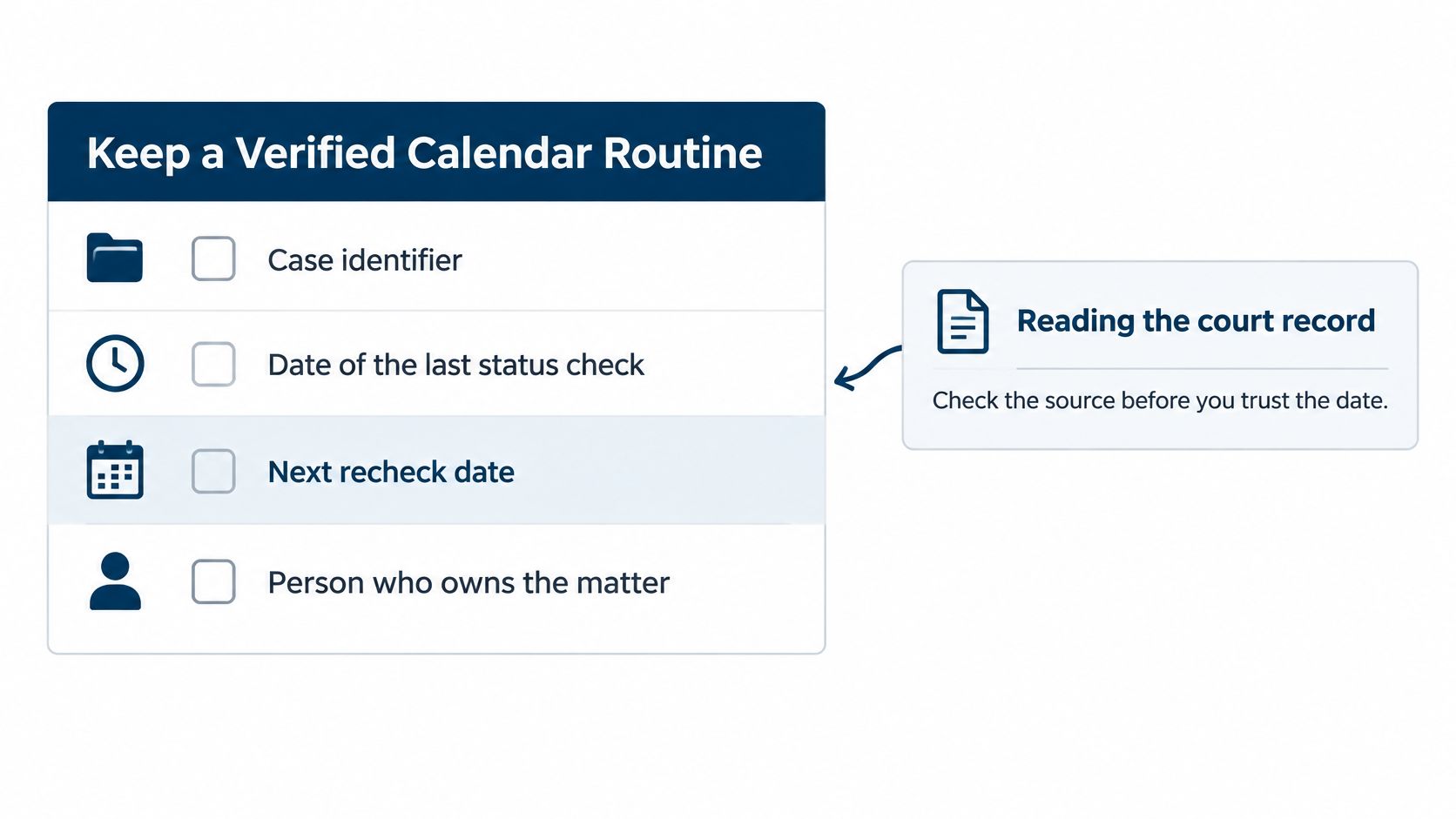
The routine itself is short. Check the source when a matter opens. Recheck the Court Dates search and the county calendar on the day the case is set. Recheck again the business day before the hearing. Log every change with a timestamp and the name of the person who confirmed it.
Then add two habits that often get skipped. Review holiday and advisory notices at the start of each court year, before the January deadlines land. And assign one person to own the weekly sweep of open matters, with the attorney signing off on any high-risk date before a filing or client notice goes out. Shared ownership is how a date goes unchecked.
If your team tracks many matters, automated docketing in a tool such as MatterAlert can hold these checks in one place. Its calendar rules cover all 50 US states plus select Canadian jurisdictions, which matters for firms running the same verification discipline across state lines. Treat any tool output as a lead until it matches the court's own source. That rule doesn't change because the data arrived through a subscription.
A working court calendar NC teams can defend has three traits: every entry names its source, every entry carries a timestamp, and every high-risk date gets a second look from a human.
Pick the next hearing on your list. Confirm its source, its timestamp, and its courtroom before you do anything else today.
MatterAlert was built for exactly this problem: rules-based calendars that calculate deadlines from trigger dates, adjust for weekends and holidays, and sync changes to Outlook within a minute, alongside live docket monitoring through PACER and UniCourt so a continuance doesn't sit unnoticed. You get one dashboard for matter dates, tasks, and the notices that change them, with every change logged for audit. Visit MatterAlert to see how a verified calendar routine runs when the checking is automated and the confirmation still belongs to your team.