

The most popular advice about court days vs calendar days is that calendar days are easy to count and court days just mean weekdays. That shortcut can put a filing date on the wrong day. The governing rule decides what counts, which event starts the clock, and what happens when the deadline lands on a day the court is closed.
The distinction matters most when a team treats the number of days as the whole calculation. It isn't. The same stated period can produce different deadlines depending on the counting unit, service method, court calendar, and final-day rule.
Court Days and Calendar Days Side by Side
| Factor | Calendar days | Court days |
|---|---|---|
| Counting unit | Every day in the period | Only days the court is open |
| Weekends inside the period | Counted | Skipped |
| Legal holidays inside the period | Counted | Skipped |
| Final day on a weekend or holiday | Moves to the next qualifying day under federal Rule 6(a) | Depends on the rule; some state rules move it back to the previous court day |
| Typical use | Federal civil default and many state rules | Rules that say court days, such as certain California motion notice periods |
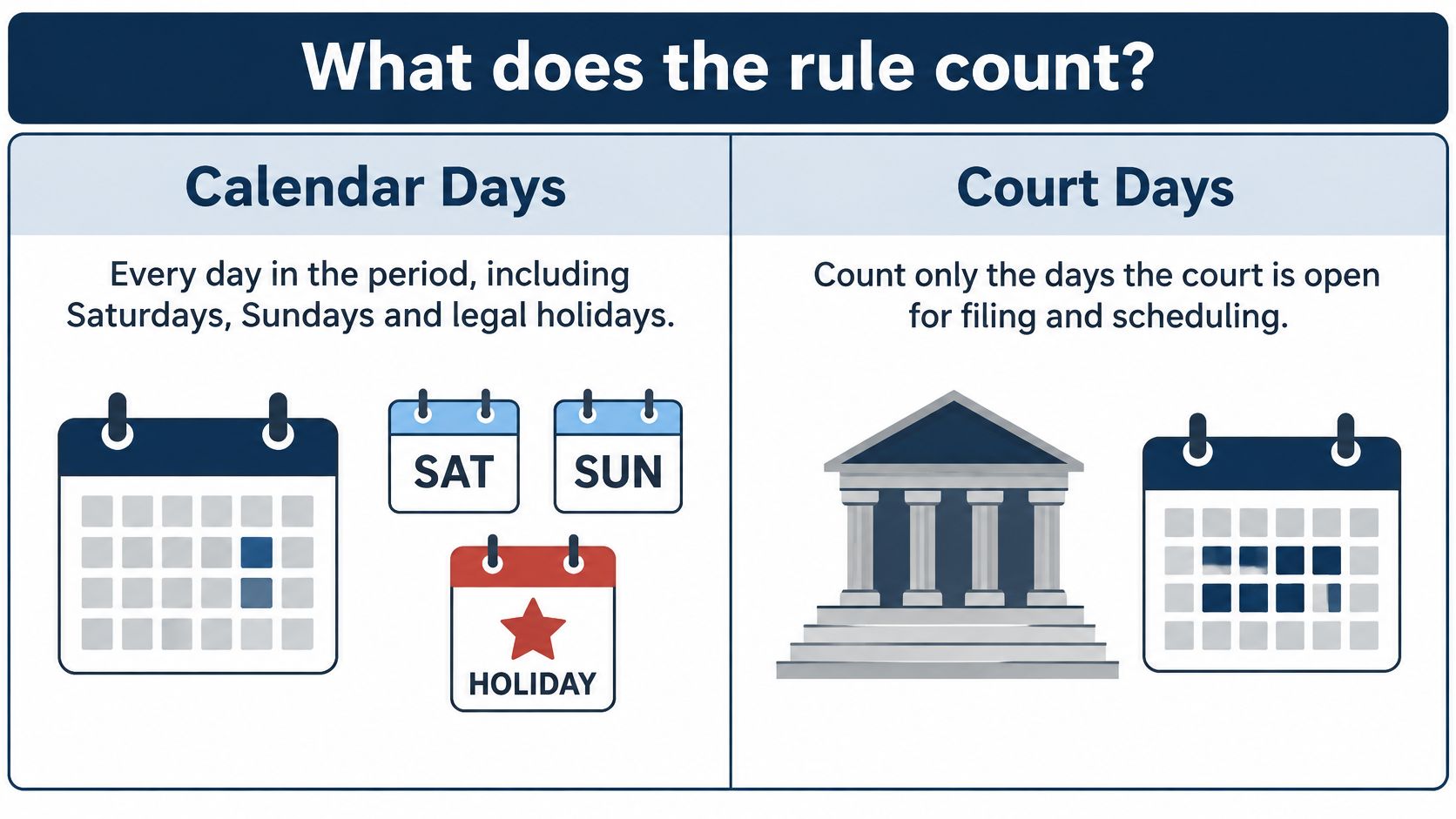
Calendar days include every date in the interval, including Saturdays, Sundays, and legal holidays. Court days count only days the court is open for business, so weekends and court-recognized holidays are omitted from the count. That difference changes how quickly a deadline arrives. A stated period of ten calendar days uses up weekends in the middle; ten court days does not.
Federal civil litigation generally uses calendar-day counting under Federal Rule of Civil Procedure 6(a). The rule counts intermediate weekends and holidays, then moves a deadline forward if the final day falls on a Saturday, Sunday, or legal holiday. State rules and specialized proceedings can use a different unit or a different endpoint convention, so the federal default isn't a safe assumption everywhere.
The wording in the governing rule matters more than the label in a calendar tool or a colleague's memory. For a practical comparison, the legal calendaring guide from Legal Professionals, Inc. notes that ten calendar days can cover seven weekdays when no holiday intervenes, while ten court days usually span at least twelve calendar days.
The federal count has a specific sequence. Follow it rather than treating every closed day as a reason to pause the clock.
How the Federal Calendar-Day Count Works
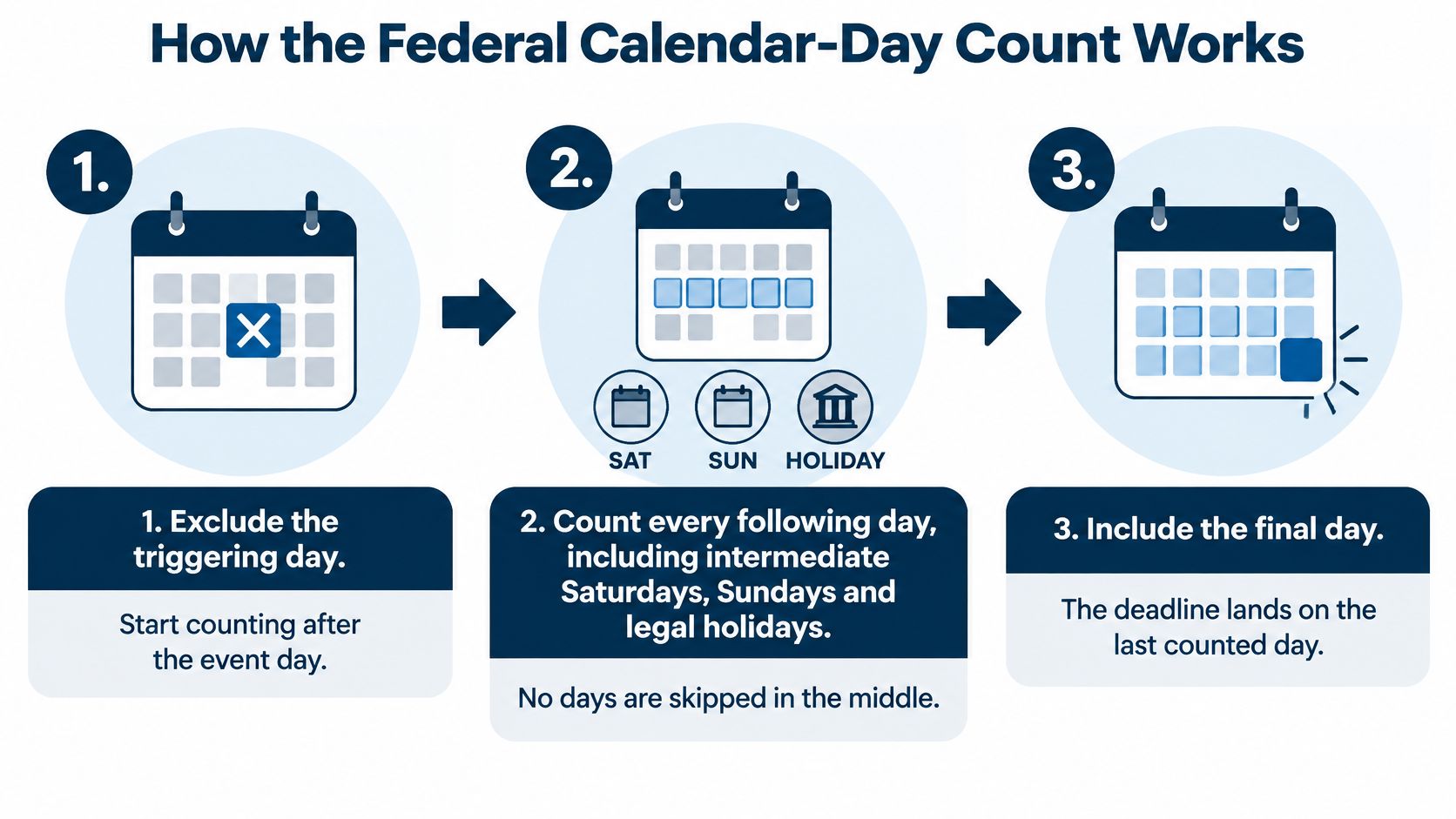
Federal Rule 6(a)(1) sets the counting method for periods stated in days. The official text of Federal Rule of Civil Procedure 6 explains how to count the days and adjust the endpoint.
- Exclude the triggering day. If a deadline starts after an event on Monday, Monday is day zero. Begin counting Tuesday.
- Count every following day. Include Saturdays, Sundays, and legal holidays that fall inside the period. For example, if Thursday is day three, the Saturday and Sunday that follow still count as days four and five.
- Include the final day. For a fourteen-day period triggered on Monday, Tuesday is day one, and the fourteenth counted day is the following Monday, unless a holiday changes the endpoint.
- Move a closed endpoint forward. If the last counted day is Sunday, the deadline normally moves to Monday, provided Monday is not a legal holiday. If it is, continue to the next qualifying day.
The middle of the count and its endpoint work differently. A weekend in the middle consumes time; a weekend on the final day can move the deadline forward. A courthouse closure does not pause the count throughout the interval.
The federal method changed on December 1, 2009. Before the amendment, periods shorter than eleven days generally excluded intermediate weekends and holidays. The amended rule counts those days for every period stated in days, which is why many former ten-day periods became fourteen-day periods.
If the clerk's office is inaccessible on the last day because of weather or another condition, the period continues to the next day the office is accessible. For docketing, record the trigger date, governing rule, jurisdiction, holiday calendar, and endpoint adjustment with the calculated date. That gives a reviewer the information needed to reconstruct the result, rather than relying on a bare entry such as “14 days.”
What Ten and Fourteen Days Look Like on a Calendar
| Stated period | Calendar-day method | Court-day method |
|---|---|---|
| 10 days | 10 calendar days, or about 7 weekdays with no holiday | At least 12 calendar days |
| 10 days with one holiday in the period | 10 calendar days, with the holiday counted | About 15 calendar days |
| 14 days | 14 calendar days, or about 10 weekdays | About 18 calendar days |
A ten-calendar-day period is a straight run of dates. A ten-court-day period skips weekends and court holidays, so the due date generally lands later. Add a holiday to a court-day interval and the span grows again. These are calendar-span comparisons, not substitutes for calculating a particular deadline from its actual trigger date.
A common docketing error starts with a motion served on Friday. Someone enters “ten days” in a calendar tool and mentally counts two workweeks, or assumes that the weekend at the end pushes the date automatically. Neither estimate is reliable unless it matches the rule. The period might use calendar days, court days, or a special service calculation, and its final-day convention may differ by jurisdiction.
Practical rule: Count the required days under the rule first, then mark the calendar date. Don't estimate a weekday and work backward.
Use a calendar tool that applies the governing rule, not a mental estimate. The gap between methods grows when the period includes more weekends or holidays, and a generic business calendar may not match the court's schedule. A rule-by-rule check matters even when two deadlines arise from the same matter.
Where Court-Day Rules Apply Across Jurisdictions
The same period can produce different deadlines under different rules. The counting unit determines which days accrue; the rule's endpoint provision determines what happens when the last day falls on a weekend or holiday.
| Rule or source | Counting unit | Final-day treatment |
|---|---|---|
| Federal civil, FRCP 6(a) | Calendar days | Rolls forward to the next day that is not a weekend or legal holiday |
| California CCP § 1005(b), motion notice | Court days | Weekends and holidays are excluded from the count |
| Bankruptcy Rule 9006 | Calendar days | Endpoint rolls forward to the next day that is not a weekend or legal holiday |
Consider a federal response and a California motion notice arising from the same trigger. The federal period generally counts calendar days and moves a weekend or holiday endpoint forward. The California motion notice period uses court days, so weekends and holidays are skipped during the count. Each deadline needs its own rule-based calculation and applicable court calendar.
The table gives examples, not a universal rule for every state or proceeding. Confirm the governing rule's counting language and endpoint treatment. MatterAlert connects to CalendarRules to generate deadlines from court rule sets, but docket availability and rule coverage vary by court and jurisdiction, especially in Canada. Confirm the specific courts and rule sets during a demo.
The counting unit and final-day treatment are separate decisions. A correct count under the wrong rule still produces the wrong deadline.
How Service Method Changes the Start Date
The same fourteen-day period can end on different dates because service method may change the time allowed. First identify the event that starts the clock. A rule may measure from service, an order, a docket notice, or another specified event. Actual receipt is not necessarily the trigger.
Under current Federal Rule of Civil Procedure 6(d), service by mail adds three days to the prescribed period. The extra time is added after calculating the original period; it does not change calendar days into court days. The rule's current text does not provide the same three-day addition for electronic service.
Consider a motion served on Monday, August 23, 2010, with a fourteen-day response period. Counting from the day after service places the fourteenth day on Monday, September 6. Because that date is Labor Day, the federal endpoint rule moves the deadline to Tuesday, September 7. If the motion is served by mail, the three additional days extend the deadline to Thursday, September 9.
The service date starts the period in this example, not the date the recipient receives the motion. The added time depends on the service method; the counting unit remains unchanged.
Before you calendar: Record the trigger event and service method separately. “Fourteen days after service” and “fourteen days after filing” can produce different deadlines.
Separate deadlines in one matter may follow different rules. A notice period might use court days, while a response period uses calendar days with an added service allowance. Keep each deadline's source, trigger, service method, and calculation with its calendar entry. A shared matter or start date does not make the rules interchangeable.
How to Verify the Counting Method Before You Calendar
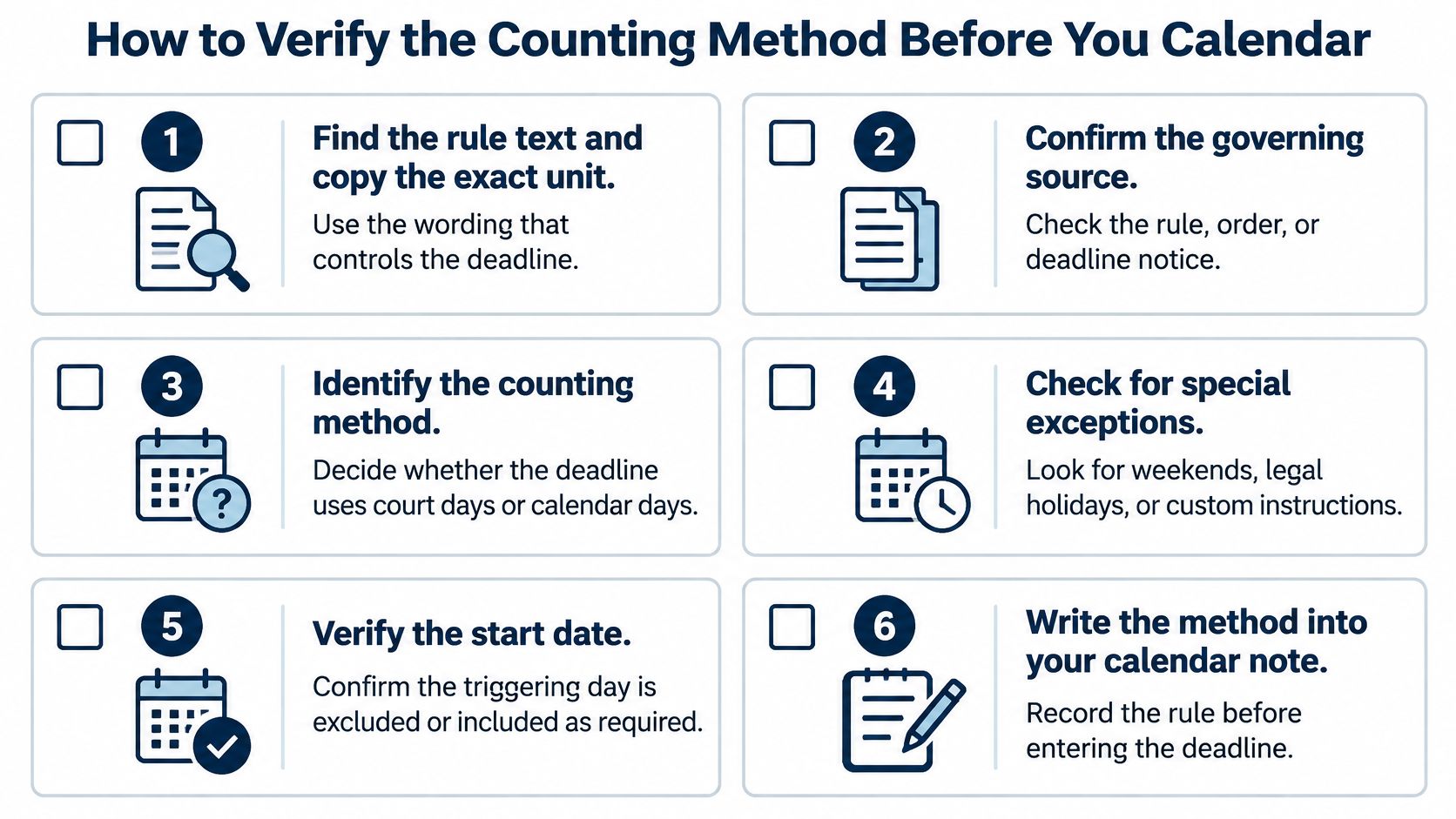
Use a verification routine for every new deadline. The point isn't to make the count complicated. It's to make the result auditable when someone else has to check it.
- Find the rule text and copy the exact unit. Record whether the source says “days,” “court days,” or “business days,” because a wrong unit changes the entire calculation. Don't let a calendar tool or an old note replace the rule language.
- Confirm the governing source. Identify the rule, statute, order, or deadline notice that controls, since a case-specific order may set a different period. Save the citation with the entry so another reviewer can find the same authority.
- Identify the trigger event and its date. Establish whether the clock starts with service, filing, entry of an order, or another event, and capture the time zone if the court uses one. A correct count from the wrong event is still a missed deadline.
- Check service method and added time. Confirm whether mail or another permitted service method adds time under the applicable rule. Don't apply an old service assumption to electronic service without checking the current text.
- Use the court's holiday calendar and apply its endpoint rule. Check the court's recognized holidays and any closure order, then apply the rule's stated rollover direction. One common error is using federal forward rollover for a state rule that moves the date back.
- Record the calculation and check it independently. Keep the trigger, unit, holiday set, service assumptions, and final-day rule in the calendar note so a reviewer can rebuild the date. Then compare the result with a second, independent count.
Manual calendaring becomes harder when a firm handles multiple courts, rule versions, and service methods. A closer look at the malpractice risks of manual legal calendaring can help teams review where their process needs stronger controls.
CalendarRules tracks critical trigger dates for courts across North America with 2,200+ rule sets, calculates deadlines with weekend and holiday adjustments, and updates calendar events automatically when a court changes its rules. Those functions can support a consistent workflow, but the team still needs to confirm the court and rule set that apply to a particular matter.
Build a Safety Date Before You Rely on the Count
Set an internal safety date earlier than the legal deadline for every calculated deadline. The rule determines when the filing is due; the safety date gives the team time for attorney review, filing validation, service checks, time-zone cutoffs, and possible docket-access problems.
A weekend can count toward elapsed time even when filing isn't practical that day. Electronic filing may remain available while the clerk's office is closed, but confirm that with the specific court rather than assuming every court handles access the same way. A court order can also set a bespoke deadline, so don't substitute a general rule for the order in the case.
For a practical decision:
- Use the rule's stated unit. Count calendar days only when the governing rule calls for that method.
- Use the court's own calendar. Check local holidays, closure notices, and the filing channel's availability.
- Set an earlier team date. For matters that cross jurisdictions, choose the earliest safe date that allows the responsible attorney to review and file.
- Recheck changes. Review the calculation when the court updates its rules or issues an order.
Case-specific orders can set filing requirements that differ from the usual calculation. Keep those instructions with the matter and use them when assigning tasks; a case-management order workflow should preserve the deadline source and responsibility alongside the date.
MatterAlert combines CalendarRules deadline calculation with PACER and UniCourt docket access, matter templates, tasks, audit logs, and Outlook synchronization in one matter-centered platform. Write the safety date into the calendar before the first draft is due.
MatterAlert helps legal teams calculate court deadlines from trigger dates, coordinate matter tasks, and keep calendar changes synchronized with Outlook. Visit MatterAlert to see how its docketing and calendaring workflows can support your court-day and calendar-day process.