

You're three days from a response deadline, and the only record of the client's instruction to seek an extension is a line in someone's notebook: "client ok with delay." No date. No time. No note of who said it, or what exactly they agreed to.
That's how notes fail. Not through dramatic error, but through a small omission nobody catches until a partner, an auditor or opposing counsel asks a question the file can't answer.
A case management notes template exists so that question has an answer. Treat every entry as evidence instead of a diary page and the design decisions get simpler. Separate the time an event happened from the time you wrote it down. Keep client facts apart from attorney judgment. Attach an owner to every action, and a deadline to every owner.
Template Fields Every Matter Note Needs
Start with the field set. Everything else is negotiation about wording.
| Field | What to enter | Example |
|---|---|---|
| Matter ID | Firm matter number used in every linked system | 2026-0417, Harbor v. Lindqvist |
| Event date and time | When the call, meeting or filing happened | 3 March 2026, 2:30 p.m. |
| Entry date and time | When the note was written and saved | 3 March 2026, 4:10 p.m. |
| Author | Person who wrote the note | Jordan Ellis, paralegal |
| Participants | Everyone on the call or in the meeting | Client and opposing counsel's assistant |
| Contact method | Phone, email, video, in person or court portal | Phone |
| Information source | Client statement, document, court record or attorney judgment | Client statement |
| Summary of facts | Neutral account of what was said or shown | Client confirmed receipt of the 2 March interrogatories and asked about an extension |
| Decisions and advice | Client instructions and advice given, kept apart from facts | Client instructed us to file the motion |
| Action items | Each task with owner, due date and status | Draft motion, Ellis, 6 March, open |
| Linked records | Task, calendar event, document or deadline ID | Task 8841 draft motion; deadline 12 March |
| Late entry reason | Filled only when the entry falls outside the standard window | Entered two days late during attorney travel |
Twelve rows looks heavy until you sort them into three blocks. Identity covers matter ID, event and entry timestamps, author and participants. Content covers contact method, information source, the neutral summary and the advice given. Follow-up covers action items plus every linked task, event, document and deadline.
Identity first, because nothing else gets found without it
The American Psychological Association's record-keeping guidance sets the operational bar, and it translates cleanly from clinical files to legal matters. Make legible and accurate entries as soon as practicable. Organize records so the practitioner and other authorized people can use them. Train the staff who handle confidential material. A note that can't be located or understood has no management value, no matter how carefully it was written.
Event time and entry time must stay in separate fields. A call that happened on 3 March at 2:30 p.m. and was written up at 4:10 p.m. is still a 3 March event, and the 100-minute gap is normal. A call documented nine days later is also fine, but only if the note says so. New York City's case management standards require notes within three business days and require each one to identify the contact person, contact type, summary, actions and responsible individuals (NYC case management standards). A 2025 New York State audit found five instances of late case-note documentation, with the worst delay exceeding the standard by six days, plus monitoring systems that didn't track all documentation compliance.
That's the case for the late entry reason field. It stays empty on a routine note and becomes mandatory the moment the entry misses your window. One optional field, filled rarely, beats a policy memo nobody reads.
Keep facts and judgment on separate lines
The content block is where notes get sloppy. Client statements go on fact lines. Advice, assumptions and open questions go somewhere else, clearly labeled. Mixing them means a later reader can't tell what the client said from what the lawyer concluded.
If you want to see the same field logic applied to a phone-heavy regulated workflow, this call notes guide for mortgage brokers lays out structured call capture outside the legal context, and the discipline is identical.
If a colleague who never met the client can't tell who spoke, what was decided and who acts next, a field is missing.
One more rule keeps the template honest. A field stays required only if someone downstream uses it. If no reviewer, auditor or successor attorney ever reads a field, delete it and stop collecting noise.
How to Write Each Note Step by Step
Fill the fields before you write a sentence of narrative. Each step produces the input the next one needs, and practice-management guidance backs the sequence: lawyers are expected to document every meeting, conversation and telephone communication with dated file notations, and to keep the matter's documents, evidence and property traceable (Law Society of Ontario file management guidelines).
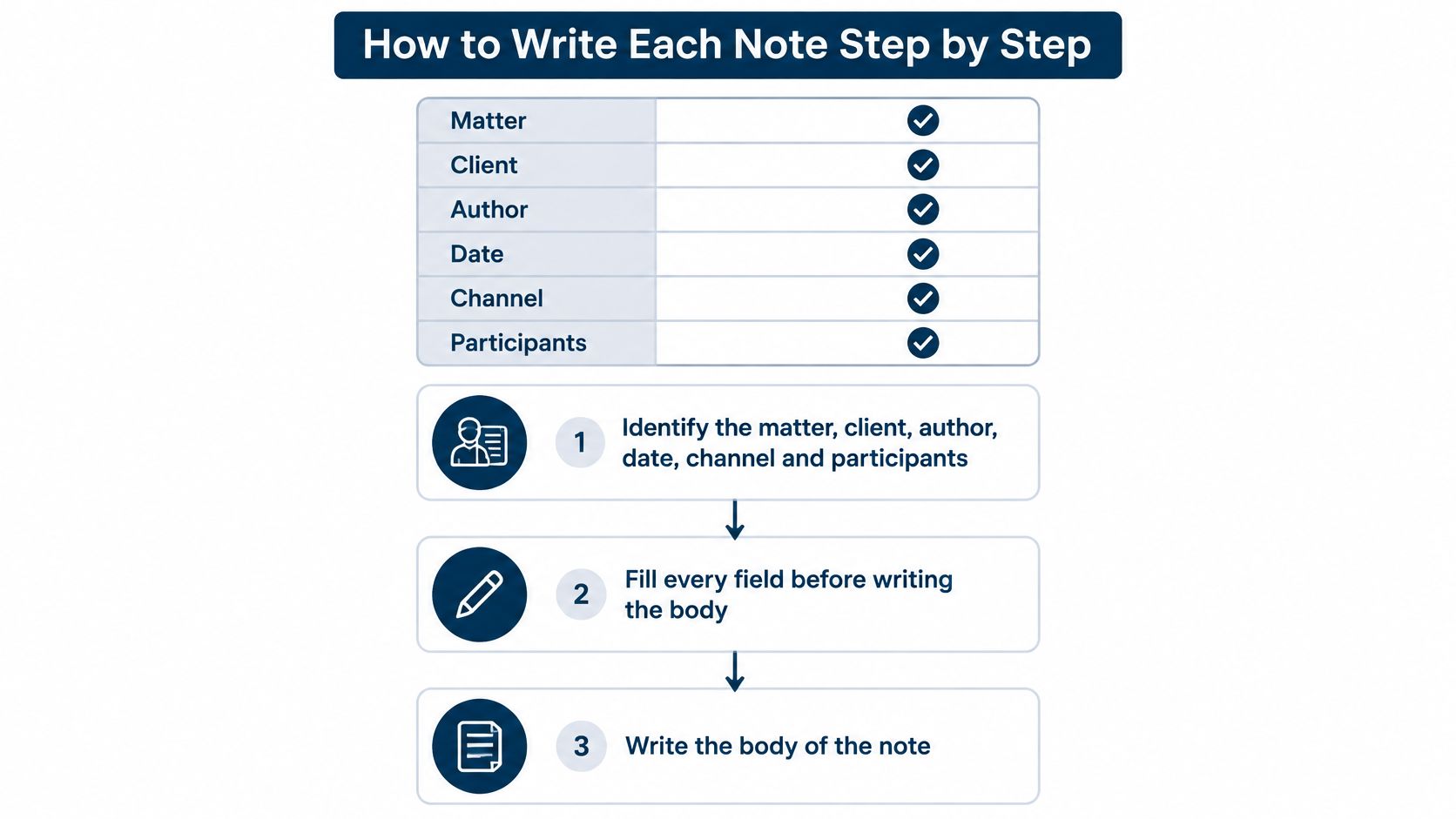
Here's the sequence I'd hand a new paralegal on day one.
- Identify the matter, client, author, date, channel and participants. Do it before the body, because a note without a matter ID can't be retrieved when the client calls back in eighteen months. The common slip is typing the writing time into the event time field.
- State the purpose in one line, then record the facts. The purpose tells the reader why the contact happened. The facts are what was said or shown, not how the conversation felt. Writing a story instead of facts is the slip here.
- Split client-provided facts from analysis, advice, assumptions and open questions. Give the client's account its own lines, then a separate block for what the lawyer concluded and what remains unknown. The slip is putting a legal conclusion on a fact line, where a later reader treats it as something the client said.
- List every document, exhibit or undertaking mentioned, with its ID. "The lease" means nothing in a file holding three of them. Naming a document without a file reference is the slip.
- Assign each action an owner, due date, dependency and status. A task with no owner is a task nobody does, and a task with no date is a task that never comes due. Both omissions should trip a warning at save.
- Link the note to the deadline, task, document or court event it touches. The link is what turns a sentence into a work item someone can be chased for. Leaving it blank because the commitment lives in an email thread is the slip, and it's the most common one.
- Apply a confidentiality and review classification, then save. Routine notes still get a class, because classification is what lets you share a file without leaking a settlement figure. Skipping review because the entry looks boring is how errors survive.
Two benchmarks belong in the written policy. 100% capture of material client communications, and 100% completion of owner and due-date fields for anything actionable. A note missing either one goes to a same-day exception queue rather than being accepted.
Clinical teams solved a version of this problem years ago. These note structures for clinical documentation show how a fixed skeleton frees the writer to spend attention on substance rather than formatting, which is exactly the trade you want in a legal file.
A finished note passes one test. A reviewer reads it in under two minutes and knows the next step without asking anyone.
Recording Deadline Calculations Inside a Note
A note that says "response due 1 July" is a claim. A note that shows the trigger, the counting method and the arithmetic is proof.
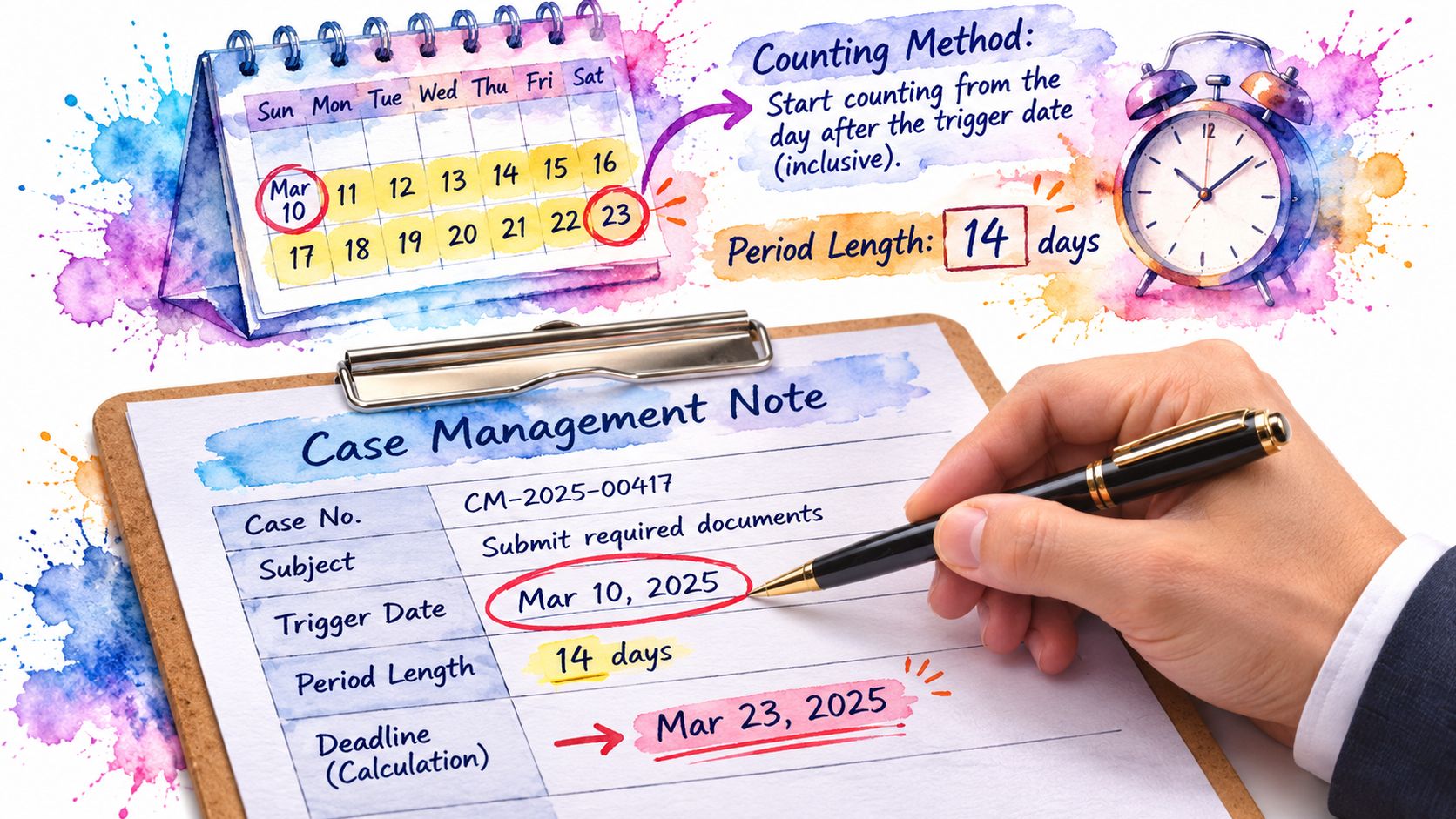
Take one worked example from the Southern District of New York deadline FAQ. Federal Rule of Civil Procedure 6 excludes the day of the triggering event. The count then includes Saturdays, Sundays and legal holidays. If the final day lands on a weekend or a holiday, the deadline moves to the next day that isn't one of those. So a 30-day period beginning after an order dated 1 June starts on 2 June.
| Element | Entry | Why it matters |
|---|---|---|
| Trigger date | Order dated 1 June 2026 | Starts the clock |
| Counting start | 2 June 2026 | The trigger day itself is excluded |
| Day 30 | 1 July 2026 | Calculated end of the period |
| Weekend or holiday check | 1 July 2026 is a Wednesday, so no shift applies | A Saturday, Sunday or holiday would move the due date to the next day that is not one of those |
| Controlling rule | Case order, FRCP 6 or FRAP | Names the source that sets the count |
| Checked by | Reviewer name and date | Makes the calculation verifiable later |
Name the rule, not just the date
Three different sources can control the same deadline. A case-specific order may set its own period and its own trigger. The Federal Rules of Civil Procedure govern civil actions. The Federal Rules of Appellate Procedure govern appeals, and they count differently in places. A note that records only the output date forces the next reviewer to guess which body of rules produced it.
The consequence is practical. When opposing counsel disputes timeliness, the file has to show the trigger, the period and the method in one place. A displayed date with no underlying reasoning can't be audited, and a human has to be able to reproduce every step.
Non-negotiable: any deadline extracted from narrative text gets human validation before it reaches the calendar. Automated docketing rules are only as reliable as the trigger someone recorded in the note.
Logging Docket Checks and PACER Costs
A docket check is a record of what was searched and reviewed, not just a tick beside “PACER checked.” Keep the search, docket entry view, document download, and quarterly statement distinct. Each answers a different question about what the team did and what the matter incurred.
| Activity | Fields to record | Billing rule |
|---|---|---|
| Docket search | Court, case number, party name, search terms, search date and time | Charges depend on the pages the search generates |
| Docket entry view | Entry number, filing date, filing description | $0.10 per page |
| Document download | Document number, page count, document type, retrieval cost | $0.10 per page, capped at $3 per document |
| Quarterly statement | Total charges for the quarter and the matter they belong to | Billed quarterly; fees waived when the total is under $30 |
The PACER pricing FAQ states that access generally costs $0.10 per page, with a $3 per-document cap. Search charges depend on the pages a search generates, so confirm the current PACER fee rules before budgeting for heavy searching. PACER bills quarterly, and fees are waived when the quarter's total stays under $30.
Why "PACER checked" fails an audit
That phrase leaves basic questions unanswered: which court and case were searched, what terms were used, whether a match appeared, and whether anyone opened the filing. Record the court, case number, party name, search terms, and search date and time. For a result, add the entry number and filing description, then note the page count and whether the document was downloaded. These fields let another person identify the record reviewed and return to it.
Record the cost with the activity and assign it to the matter. That gives the team a usable expense history for docket monitoring and a clearer basis for client budgeting. When work spans different venues, a reference to circuit court docket patterns can help readers understand how entries are organized across courts.
Record the time, not only the date. Two checks on the same afternoon are distinct actions. Mark the result status explicitly, including “no matching case,” so the record shows what the search found, or did not find. Keep facts about the docket separate from attorney judgment about what an entry means. The search time records when the check occurred; the entry time records when the note was made. That distinction helps a later reviewer understand both the event and the record of it.
Reviewing Notes Before They Are Final
A note can be accurate when drafted and still fail as a record if its timing, source, or follow-up is unclear. Review each entry before it becomes final, with more scrutiny for actions that could affect a client's rights or the firm's obligations.
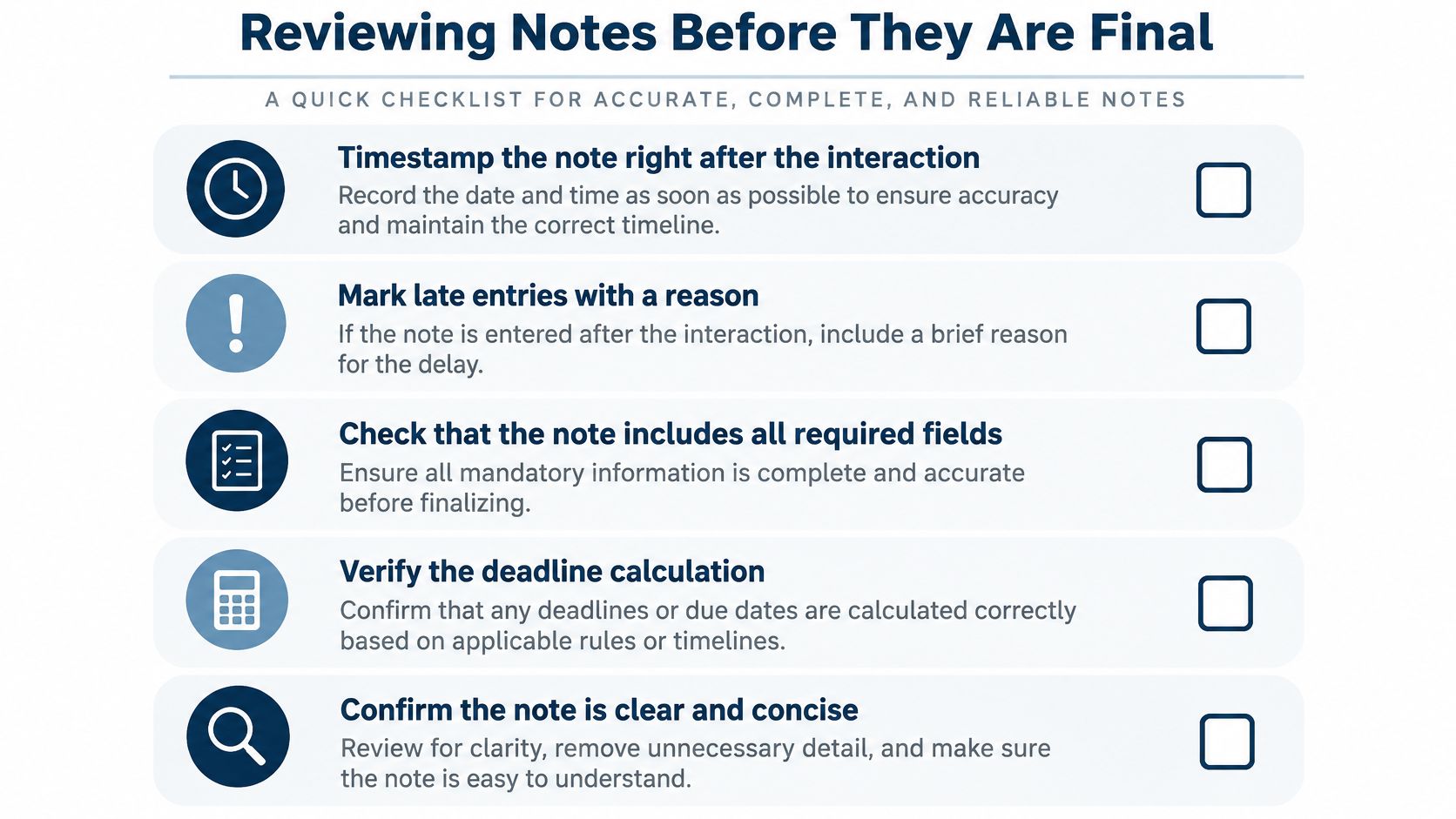
Use a consistent check. Confirm the event timestamp and, for a late entry, record why it was entered later. Keep client-reported facts distinct from attorney judgment, and name the information source. Make sure the note identifies the action owner and the deadline that action serves. Reconcile commitments against the matter task list and calendar, then confirm linked records exist. The Oregon State Bar practice management guide supports prompt follow-up and a prompt memo to the file: notes made during a conversation can prevent misunderstanding, clarify the lawyer's thinking, and provide evidence in a later malpractice dispute.
Require a second reviewer for limitation periods, service, filing deadlines, settlement authority, conflicts, privilege and changes in representation. Review them against the source and the relevant matter records, not just for clean prose. Confirm that created and modified metadata is retained, so later edits have a traceable history.
Closure is part of review
A completed note remains part of the client file. Firms need reliable backups, an index of client files with destruction dates, and a documented closure policy. The ABA Journal's reporting on electronic-only file retention noted that most jurisdictions permitted active or closed client files to be retained solely in electronic form when safeguards protected them, with exceptions for documents required by statute or court rule and client-owned originals. At the end of representation, records needed by successor counsel must be handed over. Record status, custodian and closure classification in the template so the file can be managed consistently.
Five measures to sample each month
A monthly random sample can show where note quality or follow-through is slipping. Track the same five measures each time:
- Median time from communication to finished note. Track the interval to spot delays in documenting conversations.
- Share of notes with linked tasks. A low share can indicate that commitments are being left in email rather than assigned for follow-up.
- Overdue actions with no escalation. Identify actions that are past due and have no recorded escalation.
- Duplicate-note rate. Count instances where the same call appears in email, docketing and the document system.
- Sampled completeness score. Score each sampled note against the required template fields.
The recurring failures are practical: bulk entry at the end of the week, actions without an owner, phone messages never written up, matter IDs entered inconsistently, and permissions that allow notes to cross an ethical wall. Sampling and exception reports help expose these patterns so teams can address the process behind them.
Keeping Sensitive Details Out of Free Text
Longer is not safer. A five-line summary with the right fields beats a page of narrative nobody can redact cleanly.
Practical rule: if a sentence would be uncomfortable read aloud in a hearing, it belongs in a structured field with an access label, not in a paragraph.
The Switchboard Technical Assistance Center's documentation guidance makes the confidentiality point directly: excessive detail and subjective opinion can jeopardize confidentiality if records are shared or subpoenaed. The same guidance notes that every interaction should be documented but that the required depth varies by interaction type. That combination argues for a minimum-necessary, purpose-specific record rather than one exhaustive form applied to every contact.
In practice that means objective fields for facts, source, action, outcome and next step, with free text kept short. Conditional prompts appear only when relevant: privilege, health information, immigration status, domestic violence indicators. Each prompt should say what to omit, not just what to include. Put an access classification on every note, and add a redaction cue for anything likely to be produced later.
AI drafting and human authorship
A drafting tool can turn rough notes into a clean summary in seconds. It can also invent a conclusion the client never reached, and that invention lands in a file that may be read by a judge. Compliance research on AI deployment keeps flagging the same concerns: accuracy, governance and data privacy. Matter data goes only into an approved tool, and a named person reviews every generated line, confirms the source, and keeps human authorship of the record.
The template also has to connect to the rest of the file. A note that doesn't link to its matter, documents, tasks and deadline is a dead end when the file gets produced. Good law document management software ties those records together while preserving privilege and auditability.
The best template collects enough to act on. No more.
Set Up Your Notes Template This Week
Pilot the template before making it standard. Choose one matter type, such as litigation or family law, and use it for every note in that group during the pilot. Then remove fields staff leave blank and clarify fields reviewers do not use. The aim is a form people can complete consistently, not a longer record.
Map each field to a task or calendar event so follow-up does not depend on email or memory. Assign a reviewer, and route notes missing an action owner or due date for same-day review. Use the monthly sample audit to check whether the template captures what the team needs.
MatterAlert templates can generate tasks, events, and documents when a matter is set up, while event-level audit logs record changes. Before relying on deadline calculations, confirm that the relevant courts and rule sets are covered, particularly for Canadian matters. Teams considering assistant workflows can also manage legal matters with Claude.
Keep the operating rule simple: each action has an owner, and the template gets reviewed regularly. A note should distinguish when an event occurred from when it was entered, separate client facts from attorney judgment, and identify who owns each action and the deadline it serves. Every note may later be read as evidence, so that structure matters.