

The most popular advice about law document management software is to compare feature lists and choose the system with the most boxes checked. That's a poor way to buy. A search feature can fail on scanned exhibits, a permission setting can leak restricted matter titles, and an integration can file a document under the wrong client without anyone noticing.
Test the software with real matter workflows instead. The useful question isn't how many features a vendor offers. It's whether the system keeps documents accurate and protected when a matter crosses offices, courts, connected systems, and AI tools.
Scorecard for Judging Law Document Management Software
Use this scorecard to compare products side by side. Copy it into a spreadsheet, then record what each vendor really does during a live test.
| Criterion | What to test | Pass signal | Red flag |
|---|---|---|---|
| Search | Full-text search with OCR on scanned pleadings and exhibits, plus filters by matter, jurisdiction, document type, author, and filing status | Scanned exhibits return hits in the same search as native files | Keyword-only search misses scanned PDFs |
| Permissions | Matter-level and document-level rights, role-based access, and ethical walls | A test user without matter rights gets no title, snippet, or count for a restricted file | Search results show restricted titles or previews |
| Version control | One persistent document identity, an ordered version chain, check-out and check-in, rollback, and comparison | Prior drafts survive a sync, and a restored version opens with its original author | Two edited copies are saved as separate files with no link between them |
| Integrations | Outlook and Microsoft 365 filing, bidirectional metadata sync, and a documented API | Filing from Outlook keeps matter numbers identical on both sides | Manual re-keying of matter numbers or one-way sync only |
| Security and audit | Encryption, single sign-on, a current SOC 2 report, event-level audit logs, and data residency options | The vendor supplies a current SOC 2 report and a log export on request | Audit logs record logins only, with no document-level events |
A pass means the feature works in a live test, not that the vendor lists it in a brochure. Use the same documents, users, and permissions for every product. If a vendor can't show the result without steering the demonstration, record that as a failure.
Set weights before the demo
Weight the criteria according to the risks your firm needs to control. For example, a 15-attorney litigation firm might assign permissions 30 percent, version control 25 percent, search 20 percent, integrations 15 percent, and security 10 percent. Those numbers are a starting point, not a universal formula.
A transactional team may put version control first because multiple lawyers revise the same agreements. A docketing-heavy team may give integrations and deadlines more weight, since missed or misrouted updates can disrupt court work. A firm with offices sharing sensitive matters should put permissions and auditability near the top.
Write down the pass thresholds before the vendor call. Decide, for example, how many seconds a search should take across 500 scanned pages, and what counts as a successful result. Pre-set thresholds make it harder to excuse a weak test because a polished demo looked convincing.
How Firm Size Changes What You Should Buy
A 2021 survey of U.S. lawyers found that 59% used document-management software features to categorize and track firm documents. Adoption ranged from 76% among lawyers in firms with 100 or more attorneys to 26% among solo practitioners, with 54% in firms of 10–49 attorneys and 40% in firms of 2–9 attorneys. That's a nearly threefold difference between the largest firms and solo practices, according to the MyCase summary of the American Bar Association's 2021 legal-technology survey.
Those figures describe different operating needs, not just different budgets. A small practice may need documents tied to matters and easy to retrieve, without the overhead of a complex permission structure. A multi-office firm needs controls that keep access consistent as teams and responsibilities change.
| Firm profile | Weight most | Minimum test | Watch for |
|---|---|---|---|
| Solo or 2–9 attorneys | Search and setup speed | A new staff member gets working access within one day | Per-user fees that grow with each new staff member |
| 10–49 attorneys | Permissions and version control | A restricted matter stays hidden from a test user in search | Versions that split when two people edit the same draft |
| 100 or more attorneys across offices | Integrations and audit logs | Sync latency and a reconciliation report from the document system | Ethical walls that need manual setup for each new matter |
| Multi-state or Canadian litigation | Integrations and deadline-linked documents | A document links to a matter and a court event on both sides | Court rules or docket coverage missing for your jurisdictions |
| In-house legal department | Permissions and AI governance | An access review by business unit in one report | AI features that switch on by default with no admin control |
Match the purchase to the workflow
Solo and small firms should focus on search, setup speed, and low administrative overhead. MatterAlert is suitable for solo and small firms that want repeatable matter templates, shared calendars, and reminders without desktop software. Don't pay for permission complexity your team won't use, but don't skip a test that confirms confidential matters stay restricted.
Firms with 10–49 attorneys should scrutinize shared drafting and access rules. Staff often work across matters, and two people may revise the same draft. Ask the vendor to demonstrate how the system handles both a restricted matter and a simultaneous edit.
Large firms across offices need reliable integrations and audit records, as well as a workable process for changing matter ownership when a lawyer leaves. MatterAlert offers centralized matter views, delegation, bulk reassignment, ethical walls, audit logs, and integrations with accounting and document systems for large firms across offices and practice groups.
For in-house teams, permissions and AI governance deserve equal attention. Business-unit access rules need to hold whenever someone runs a query, and administrators need to control how AI features handle company documents.
One market estimate places the legal document-management software sector near $3.43 billion in 2026, with projected growth of about 12.5% a year through 2030. The Research and Markets estimate is a forecast, not an audited measurement, and market totals vary by methodology. Treat it as directional context, not proof that one product is right for your firm. The table is a starting point. A docket-heavy or deal-heavy practice should shift the weights to match its actual risks.
Testing Search and Version Control Before You Buy
Start with your own documents, not the vendor's sample library. Keyword-only search can miss scanned pleadings and exhibits if the system hasn't indexed their text with OCR. Metadata filters matter, too: finding every filed exhibit for one jurisdiction may be more useful than searching a large index with no way to narrow the results.
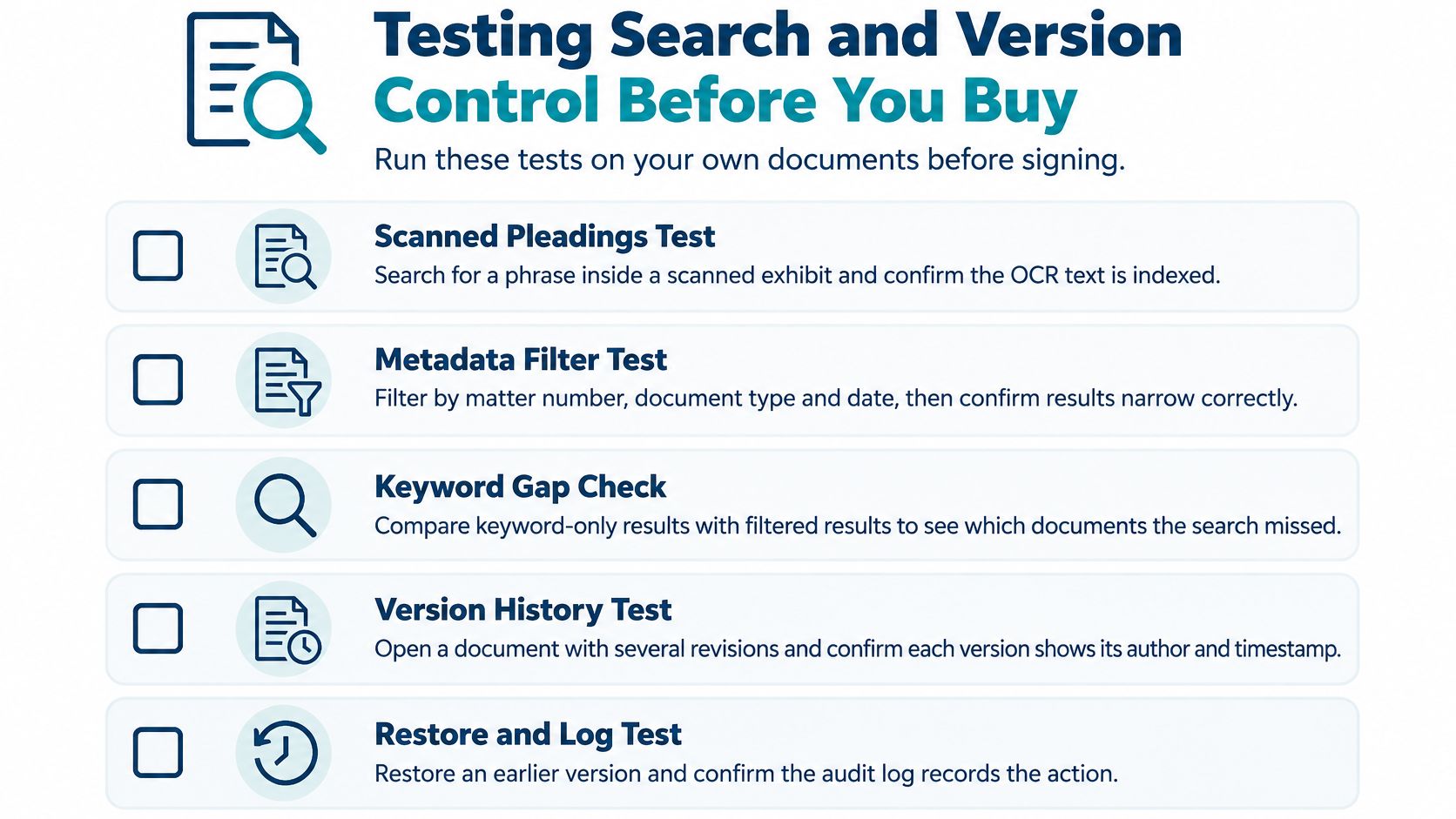
Run the same sequence in each product:
Load a representative matter. Add 50 native files and 20 scanned exhibits from one test matter. Keep a separate manual inventory so you can check whether the system's results are complete.
Search inside a scanned exhibit. Choose a phrase that appears only in one scanned exhibit, then search for it. The expected result is a hit on that exhibit, not just on typed documents.
Test metadata filters. Filter by matter, jurisdiction, document type, and filing status. Compare the result counts with your manual inventory; the counts should match the documents that meet those filters.
Check in an edited draft. Check out a draft, edit it in Word, and check it back in. Confirm that the earlier version remains in the history and that the current document retains one persistent identity.
Compare and restore versions. Open the version history, compare two versions, then roll back to the first. The restored copy should open with its original author recorded, and the change should not erase the later history.
Create an edit conflict. Have a second user edit the same file at the same time. Record whether the system blocks the second edit, warns both users, or overwrites one person's work without any notice.
A common slip is to test only clean, typed PDFs. That can make search look better than it is while hiding an OCR gap. A passing result has one persistent document identity, an ordered version chain, and no lost drafts after sync. If the vendor can't demonstrate those results on your test matter, don't treat the feature name as evidence.
Permissions, Ethical Walls and Audit Trails
A paralegal on an acquisition matter shouldn't be able to open a matter blocked by an ethical wall. The test most buyers skip is whether that restriction also applies to search results, not just to the file view.
Create a restricted matter and add a distinctive phrase to one document. Search for that phrase from an outside user account. That user should see no title, snippet, or result count that reveals the restricted file exists.

Build access around matters and document types
Use least-privilege access: give each person only the access needed for their role, at both matter and document-category levels. Folder names alone aren't a reliable way to organize confidential work. The document-management architecture guidance from Acro Photo Print recommends matter-centered classification with structured metadata such as client and matter identifiers, document type, author, date, jurisdiction, confidentiality label, and workflow status.
Keep each required field useful. A field should support a real downstream task, such as search, retention, access control, or reporting. Mandatory matter IDs and document types can make documents easier to retrieve and help connect records to matters, court events, tasks, or docket notices. MatterAlert synchronizes with in-house ethical walls, auto-restricts new matters to approved users, honors workspace-level and document-level permissions, and provides role-based access controls.
Make the audit trail useful
Look for an append-only record of views, edits, downloads, shares, and exports, tied to both the user and the matter. Ask whether the logs can be filtered by timekeeper, client, or office, and whether they cover document events rather than logins alone. MatterAlert logs changes at event and matter levels and offers reports by timekeeper, matter, client, or office, including custom report formats and dashboard analytics.
Ask two practical questions: How long are logs kept, and can the firm export them without a support ticket? Also ask where the system is hosted. In the ILTA 2025 technology survey, 76% of respondents said their document-management or enterprise-content-management systems were primarily cloud-based or delivered as SaaS, as reported by Lawcadia. Expect cloud hosting to be common, then test data residency options and how access logs are stored and exported. Review the vendor's security information as part of that assessment.
Integrations That Keep Matter Records Accurate
A document can become inaccurate without anyone editing it. Outlook may file it to the wrong matter, a synchronization job may arrive late, two systems may create duplicates, or a permission change in one system may not reach the other.
Map the systems that touch a matter before comparing products. A litigation team may use Outlook, Microsoft 365, iManage or NetDocuments, Elite 3E or Aderant, court portals, and personal drives. Every connection creates a chance for a record to go stale.
Ask for operational measures
Request these five measures and procedures from each vendor:
- Sync latency: Record the delay in minutes and define what counts as an acceptable delay for your workflow.
- Reconciliation reports: Set a frequency for comparing records between connected systems and identifying mismatches.
- Failed-integration alerts: Find out how a failed job is reported and who receives the alert.
- Authoritative source: Name which system owns each record type, such as matter number, document version, or billing detail.
- Rollback procedure: Get the steps in writing for restoring records after an incorrect sync or import.
Then ask whether metadata synchronization runs both ways or only one way. Test a practical case: a filing made in Outlook on Monday should show the same matter number in the document system by Tuesday morning. Check that result during the demo, not after signing.
MatterAlert integrates with iManage and NetDocuments. Its iManage integration displays workspaces, links documents to events and tasks, and honors workspace-level and document-level permissions. MatterAlert also works with Microsoft 365, Aderant, and Thomson Reuters Elite 3E; matter, client, timekeeper, and ethical-wall information from Elite 3E and Aderant is imported through nightly sync, with same-day search and import. Review the MatterAlert iManage integration against your own filing and permission tests.
AI Features and the Governance Questions to Settle
AI can add governance work before it removes any. Thomson Reuters reported that 65% of law firms had an AI strategy, a responsible-use policy, or both, while 46% identified data protection and reduced breach incidents as essential outcomes of legal technology, according to its 2025 AI and legal-technology report.
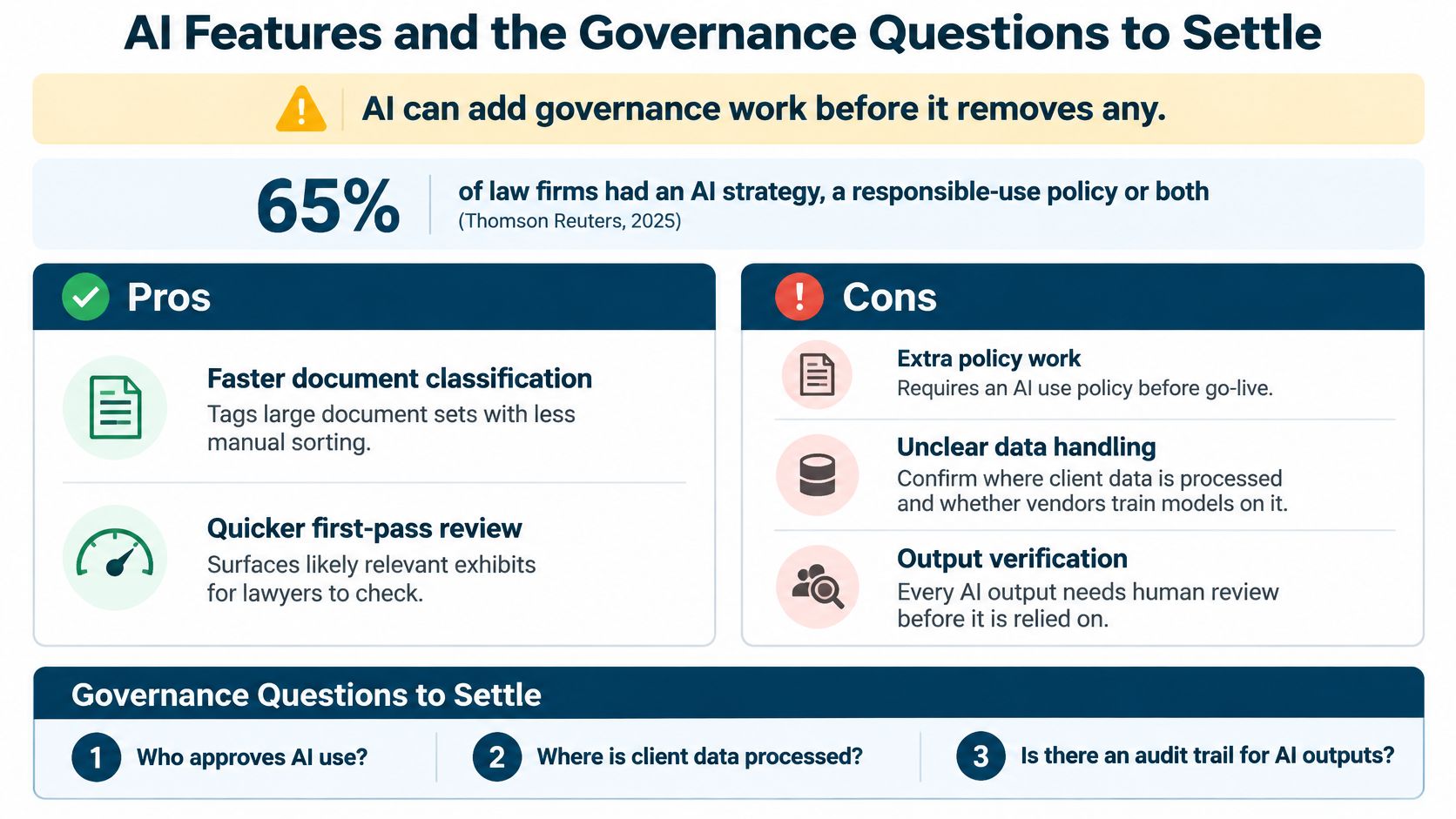
Faster search and automatic tagging can help a team sort and review documents. But the firm still needs retention rules, permission testing, human review, and an audit trail for AI actions. Before enabling a feature, settle these questions:
- Should privileged documents be excluded from model training?
- How are AI summaries logged, and does each summary link back to its source document?
- Who approves automatic classification rules?
- How does a lawyer report an incorrect matter association or an invented summary?
Test governance, not the label
Check whether the system explains why it classified or retrieved a document, isolates one firm's data from another's, exports AI activity logs, and gives administrators a way to turn features off. Confirm that search results respect ethical walls. Run every test on a restricted matter during the pilot, not just on public or low-risk documents.
The trade-off is direct: AI may speed up search and tagging, but it also creates work to govern the data and review the output. MatterAlert includes AI features for automating repetitive tasks and providing intelligent insights for matter-management decisions. Apply the same tests to MatterAlert as to every other vendor. Don't switch on an AI feature until the people responsible for access, review, and escalation know what happens when it gets something wrong.
Run a Pilot and Confirm Coverage Before You Sign
A demo shows what a product can do under controlled conditions. A pilot shows whether it works with your documents, users, jurisdictions, and integrations. Use the same inputs for each shortlisted product, then record results against the thresholds you set before the first vendor call.
Shortlist three products. Use the scorecard to select vendors that meet your firm's basic requirements. Keep the same criteria for each evaluation.
Repeat the document tests. Use the same files, restricted matter, and version conflict in each product. Record search accuracy, access behavior, and whether edits survive synchronization.
Confirm court and jurisdiction coverage. During the demo, name the courts and rule sets your team uses. MatterAlert's docket availability and rule coverage vary by court and jurisdiction, especially in Canada, so confirm the specific coverage you need.
Count every licensed user. Include attorneys, law clerks, legal assistants, and administrative staff who access the system or receive calendar synchronization. MatterAlert licensing covers each of those users when they access the platform or receive calendar sync.
Get implementation responsibilities in writing. Ask for a timeline that covers integration setup, data conversion, validation, training, and pilot rollout. Name who owns each conversion and validation task.
Pilot with one practice group. Run the pilot for two to four weeks before a firm-wide rollout. Use the group's real workflows and collect results from the people who file and retrieve documents every day.
Don't sign until the pilot meets the thresholds you wrote before the first vendor call.
MatterAlert connects matter information, court deadlines, tasks, documents, and calendar coordination, with integrations for iManage, NetDocuments, Microsoft 365, and legal accounting systems. If your evaluation includes matter-linked documents, docketing, and deadline workflows, visit MatterAlert to assess whether it fits your firm's tests.