

The U.S. Bureau of Labor Statistics counted approximately 376,200 paralegals and legal assistants employed in 2024, but projects only about 600 additional positions by 2034, a growth rate of 0.2%. That nearly flat outlook reframes the work of legal case managers: firms can't plan on solving more complex matter coordination by adding support staff. They need clear processes that keep dates, tasks, and decisions attached to each matter. (Bureau of Labor Statistics employment projections)
What Legal Case Managers Own on a Matter
“Legal case manager” isn't a universally standardized job title. The work commonly overlaps with paralegal and legal assistant roles: organizing matter information, coordinating dates, preparing documents, supporting attorneys, and maintaining case records. The important distinction is not the title. It's who owns the operational chain that moves a matter forward.
| Function | Legal case manager | Attorney | Paralegal or assistant |
|---|---|---|---|
| Matter setup | Builds the record, checklist, and matter type | Sets goals and strategy | Gathers opening documents |
| Deadline calculation | Logs the rule, trigger, and adjusted date | Approves the legal reading of the date | Prepares the filing package |
| Task ownership | Assigns one owner and a backup | Decides the work product | Completes assigned drafting |
| Court notices | Matches the notice to the matter and updates dates | Judges the legal effect | Files and serves as directed |
| Status updates | Schedules the update and records what was said | Gives legal advice | Drafts routine letters |
| Workload flags | Surfaces overdue and unassigned work | Decides staffing on the matter | Logs time on assigned work |
Keep the operational chain intact
At setup, the case manager creates a usable record: matter type, court, key contacts, documents, and a checklist suited to the work. That gives the team one place to find the matter's current state. The attorney sets goals and strategy, while the paralegal or assistant gathers the opening material.
Next comes deadline control. The case manager records the trigger, the source rule, and the calculated date. The attorney approves the legal interpretation. That division matters: logging a date and deciding what a rule means are different responsibilities. A date shouldn't become final merely because someone entered it in a calendar.
Task ownership is just as concrete. Each open task needs one accountable owner and a backup. The attorney decides what work product is needed; the assigned paralegal or assistant completes the delegated drafting. The case manager tracks whether the work has an owner, a due date, and a visible status.
Court notices need the same care. Match each notice to the right matter, identify what changed, and update only the affected dates. The attorney determines the legal effect. The assigned team member files or serves as directed. For status updates, the case manager can schedule the communication and record what was said, but legal advice remains the attorney's responsibility.
The projected workforce increase is small compared with the number of support professionals already doing this work. Multi-state firms shouldn't plan on a much larger support staff arriving to absorb growing procedural complexity. They need standardized matter setup, accurate calendars, and clear ownership instead.
Week-one check: Confirm the matter type, court, open trigger dates, and the person who must approve each calculated deadline before the team treats it as final.
Skills Legal Case Managers Use Every Week
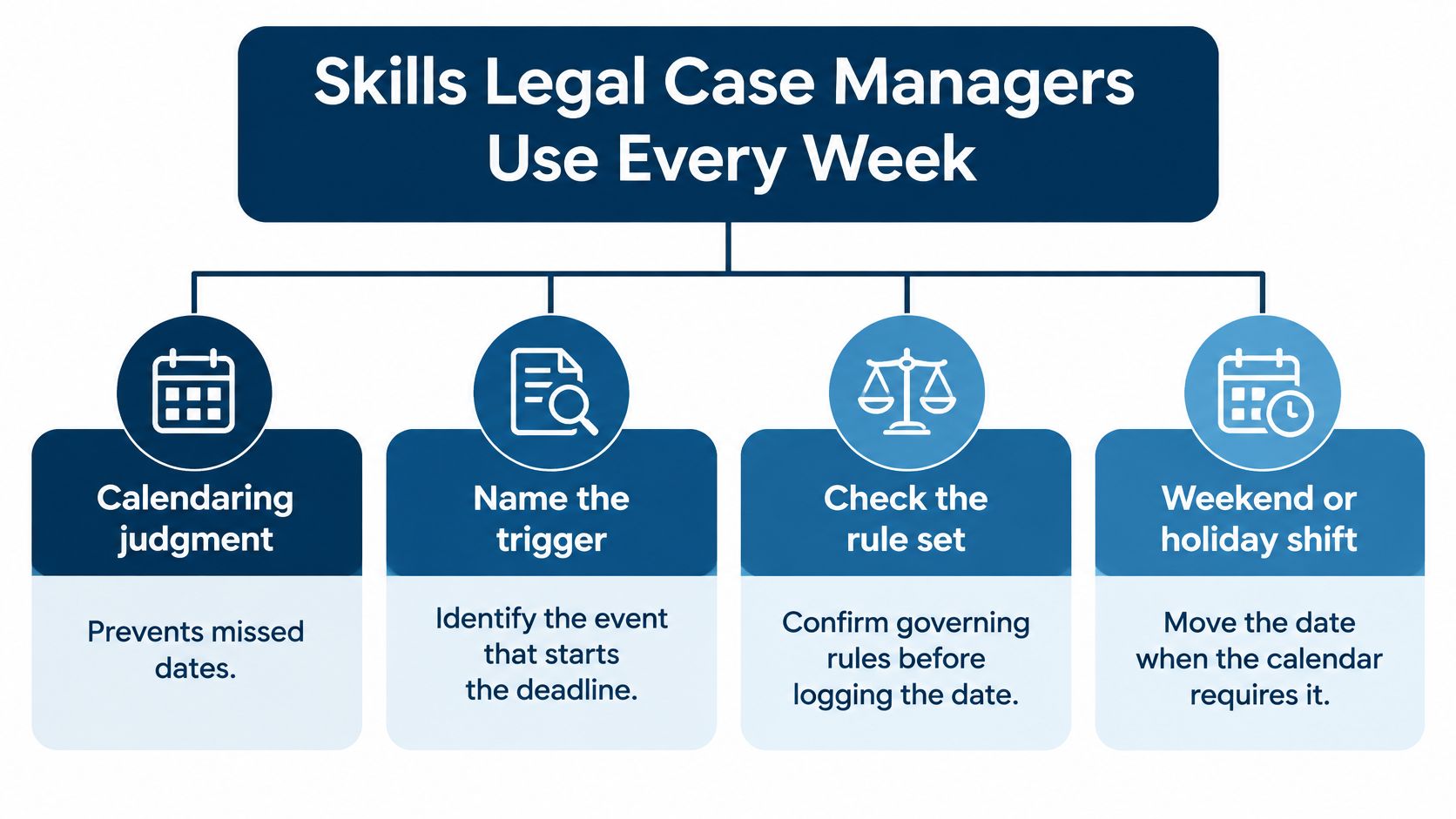
Good case management prevents ordinary mistakes from turning into urgent problems. Each skill has a practical job.
Calendaring judgment prevents missed dates. Identify the event that starts the deadline, the governing rule, and any weekend or holiday adjustment before entering a final date. If the trigger or rule is unclear, flag it for attorney review rather than guessing.
Clear writing prevents dropped handoffs. A useful note says what happened, what needs to happen next, who owns it, and when it's due. That lets a colleague take action on a busy afternoon without searching through a long email thread or calling to ask what the assignment means.
Confidentiality prevents leaks. Client facts, medical records, and draft filings should stay in approved systems. Before forwarding, uploading, or summarizing a document, check who can access the destination and whether it belongs with that matter.
Interruption judgment protects urgent work without making everything urgent. A court communication that changes a live hearing needs immediate attention. A routine question can usually become a task for the next status block, with an owner and response date.
System comfort keeps work out of private inboxes. Shared calendars, matter records, and document stores only help when the team uses them consistently. A date saved in one person's inbox is hard for a colleague to verify or take over.
The American Bar Association's 2024 technology survey received 435 attorney responses. It found that 65% of firms budgeted for technology, average annual technology spending was $13,991, and 71% of attorneys recognized a professional responsibility to understand technology's benefits and risks. Those findings make system skill part of reliable matter support, not a side task. (American Bar Association 2024 technology survey)
Test the handoff, not the résumé
In an interview, give the candidate a sample court notice. Ask them to identify the trigger, propose two internal preparation dates, name the task owner, and name the backup. The exercise shows whether they can separate a court deadline from the work needed to meet it, and whether they'll flag an uncertain date for review.
The quiet failure is often a task that nobody owns after someone leaves the office. A capable case manager checks the shared record, makes the next action explicit, and ensures another person can pick it up without relying on an informal conversation.
How to Run a Deadline from Trigger to Close
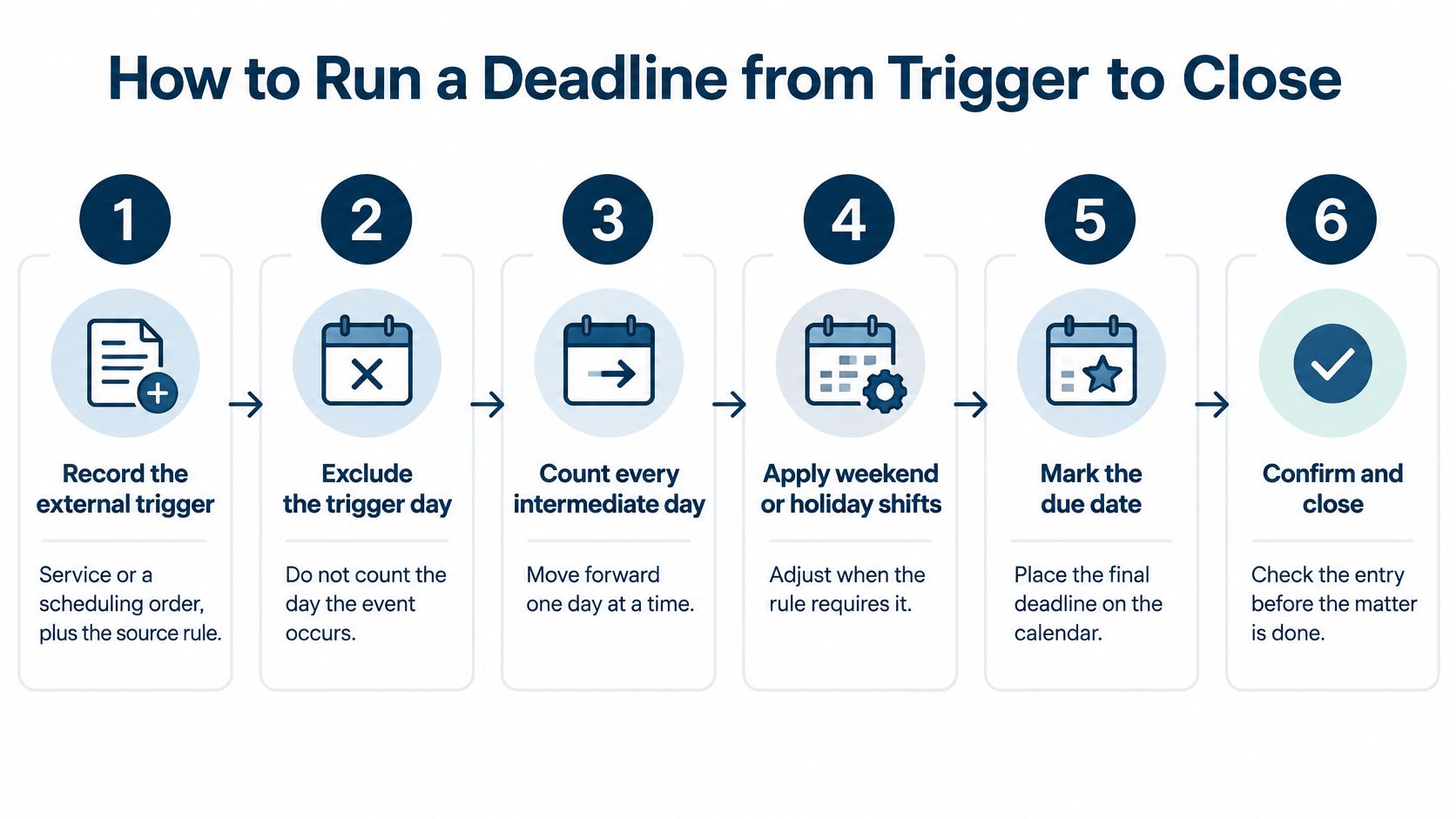
A deadline has three parts: the event that starts the clock, the rule that determines the due date, and the work needed to meet it. Record all three. Federal deadlines may follow the counting method in Federal Rule of Civil Procedure 6. State rules and individual court requirements can differ, so confirm which rules govern the matter.
Record the trigger and rule. Note the event that starts the clock, such as service or a scheduling order. Save the notice or order and record the rule used to calculate the date.
Exclude the trigger day. Under the federal method, counting starts the day after the triggering event.
Count the days in the period. For most periods, count calendar days, including Saturdays, Sundays, and legal holidays. For periods shorter than seven days, exclude those days when counting intermediate days.
Check the final day. If it falls on a Saturday, Sunday, or listed legal holiday, the deadline moves to the next day that is not one of those days. Rule 6 lists the federal holidays.
Set internal dates and monitor progress. Work backward from the court deadline. Schedule time for preparing the work, attorney review, filing verification, and service. Assign owners to each step and set reminders before each internal date. A phased schedule and regular checks help the team spot delays while there is still time to respond.
Name an owner and backup, then record closure. One person drives each task; another can cover it. Record evidence of completion, such as a filing confirmation or service record.
Internal dates create room to correct a draft, confirm a filing, or address a service problem before the court date is at risk. If a milestone is incomplete, the owner should flag it promptly and identify the next action.
For matters involving more than one jurisdiction, record the rule, trigger, calculated due date, any holiday adjustment, the owner, the backup, and completion evidence. A court date calculator for calculating legal deadlines can help with date calculations. The responsible team member still needs to confirm the governing rule and approve the final entry.
What Docket Monitoring Costs in Federal Court
Federal docket monitoring has a fee structure that can affect how often a team retrieves case information and documents. The federal judiciary charges $0.10 per page, with a $3.00 maximum for a document or case-specific report, equivalent to 30 pages. PDF billing uses the actual page count. For HTML, 4,320 bytes equal one billable page. (Federal judiciary PACER pricing)
| Retrieval | Charge | Billing detail |
|---|---|---|
| Case information or document | $0.10 per page | Maximum $3.00 per document or case-specific report |
| 12-page order | $1.20 | Page rate multiplied by page count |
| 45-page brief | $3.00 | Document cap applies |
| Service-center search | $30 | Charged even if no results are returned |
| Audio file of a hearing | $2.40 per file | Separate from page charges |
Fees are billed quarterly and waived when the total quarterly charge is less than $30. A service-center search also includes electronic document charges for up to five documents, so budget for those separately from the search fee.
For a monitoring budget, list expected searches, likely document types, and any hearing audio separately. Then note that automated or repeated retrieval can produce charges even when the case itself hasn't changed. PACER includes case information and docket materials such as motions, orders, judgments, and briefs, so a matter record should identify what was retrieved and attach it to the right case. (PACER case information and documents)
Capacity Signals That Beat a Raw Case Count
A raw case count tells you how many matters sit with a person. It doesn't show how many active tasks each matter creates, how often the person is interrupted, or whether work is waiting without an owner.
A reported personal-injury-firm case study found an average workload of roughly 30 cases per person across attorneys and staff. One firm reached 50 cases per person and reported a 67% increase in caseload after routing non-urgent questions, assignments, and collaboration requests through structured workflows instead of constant interruptions. That example points to workflow design as a capacity tool, not a promise that every team will see the same result. (Personal-injury-firm case study)
| Signal | What to check | What a warning looks like |
|---|---|---|
| Task ownership | Share of open tasks with a named owner | Unassigned work or two people assuming the other is responsible |
| Milestone hit rate | Work completed before its internal date | Tasks repeatedly finished only at the court deadline |
| Overdue-task aging | Time an item sits past its internal date | Old items staying open with no escalation |
| Reassignment time | Time needed to move dates after a staff change | Events remaining on a departed person's calendar |
| Interruption volume | Non-urgent pings that bypass the task list | Routine questions repeatedly displacing scheduled work |
Read the signals together. If tasks have owners but miss internal dates, examine workload and dependencies. If work is unassigned, fix the assignment rule before blaming individual performance. If dates remain on a departing employee's calendar, reassignment is a process risk. For a large matter, use a detailed task sheet, assign each task to no more than one team member, and review the list on a recurring full-team call.
Structured workflows shouldn't block urgent action. A court communication that changes a live deadline can justify breaking the queue. The point is to reserve interruptions for work that needs an immediate response, while routing routine requests to a task with a clear owner and due date.
For broader legal operations management, bring evidence to a staffing meeting instead of a general claim that everyone is busy. Show the overdue-task aging report and the time needed to reassign work after staff changes. Those measures can reveal whether a team needs more capacity, clearer task rules, or a better handoff process.
When AI Drafts Need a Human Stop
A polished AI draft can still contain a wrong date, name, or statement. Legal case managers help own the deadline and task risks around that draft by making sure a named person checks it before it reaches a client, a court, or a calendar.
In a 2025 survey of more than 1,700 legal professionals in the United States, United Kingdom, and Canada, respondents raised concerns about accuracy and misinformation, including the risk of false material affecting judges or juries. (Thomson Reuters summary of the 2025 legal professionals survey)

Use a short set of working rules:
Choose low-risk drafting tasks. AI may help prepare a first version of a status note or organize a chronology. A person still checks the result.
Verify details against the file. A named reviewer checks dates, names, citations, and court quotations against the source material.
Protect confidential information. Keep client secrets, medical facts, and privileged drafts out of public AI tools.
Record approval. The matter record should show who reviewed the text and which version they approved.
Escalate possible inventions. A possibly invented case, false deadline, or legal conclusion needs attorney review, not a quick edit.
Keep role boundaries clear. The case manager does not provide legal advice, and AI output does not change that.
Before a draft goes to a court, a client, or a calendar, a named person compares it with the source.
This review step works like a checkpoint: it catches errors before they become instructions someone acts on. It also makes ownership visible. If a date is wrong, the team can identify who checked the source and whether the approved version reached the right matter.
A Multi-State Week on One Matter
A commercial litigation team has a matter in state court and a separate response date in federal court. The two calendars share a client, but the dates don't share a rule. Each change must stay attached to the right case.
On Monday, a continuance notice arrives in the state case. The case manager matches it to that matter, records the new hearing, and notes which date was recalculated. The unrelated federal response date stays on its existing calendar. A continuance in one court doesn't automatically move a deadline in another.
On Tuesday, the client asks for a status update. The case manager reports dates and completed tasks, then routes a request for legal advice to the attorney. On Wednesday, the assigned attorney leaves the firm. The open events and tasks move to a named successor, along with the backup reviewer, and the handoff is recorded.
The court context makes clear why a continuance isn't free capacity. A 2025 survey of 443 state, county, and municipal court judges and professionals reported higher caseload volumes alongside decreasing backlogs, but respondents also reported increases in delays and continuances. In a separate survey of state-court staff, 53% typically worked 40–45 hours weekly, while 25% worked 46–50 hours. (Thomson Reuters 2025 State Courts Survey)
Thursday, a non-urgent question arrives in chat. Instead of letting it become a thread that only the original recipient can track, the case manager turns it into a task with an owner and due date. Friday, the team reviews overdue internal milestones. They don't treat the new hearing date as spare capacity, and they don't assume the departed attorney's private calendar is a reliable record.
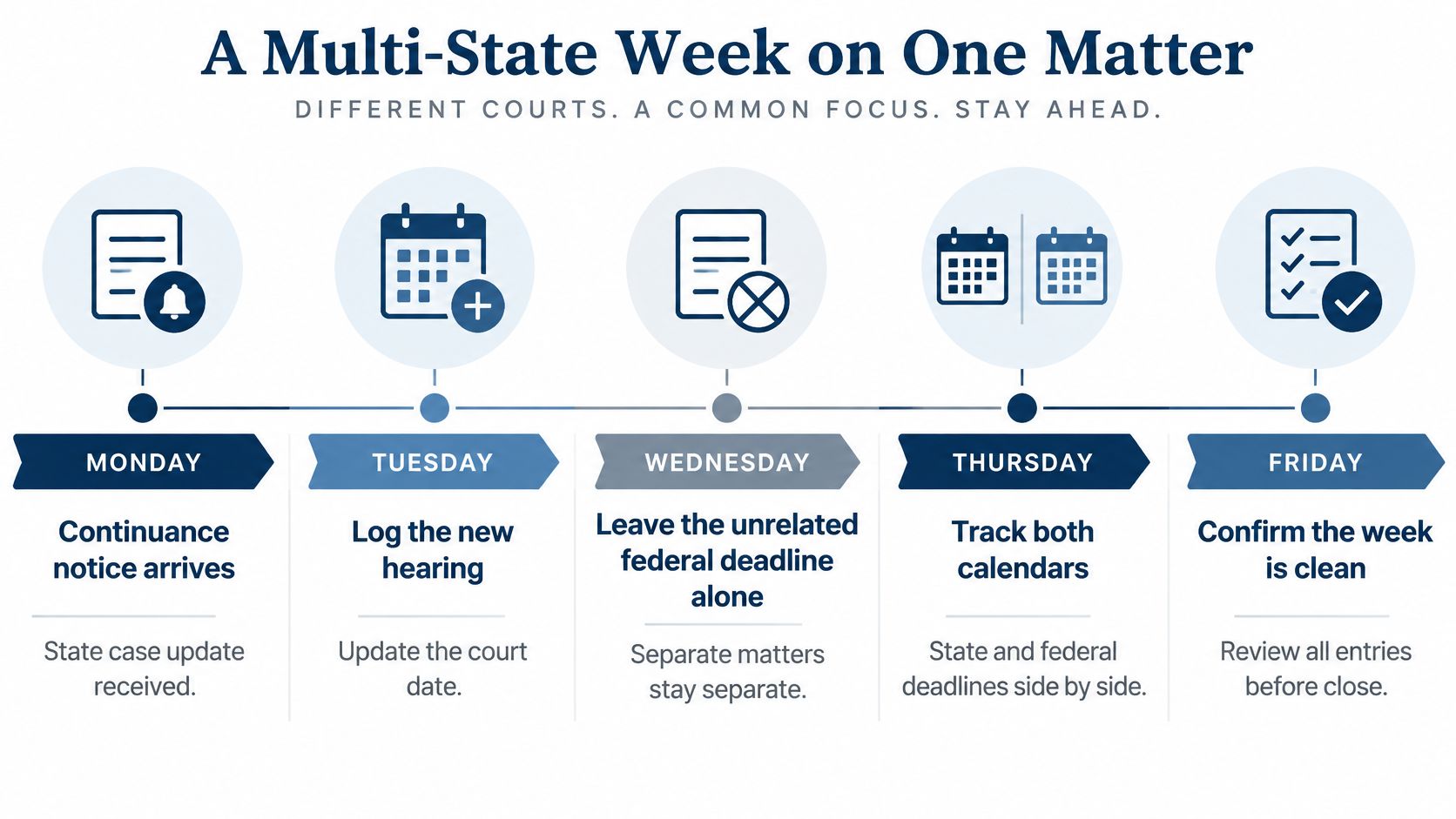
By Friday's close, the file shows the old hearing date, the new date, the task owners, the federal response date that remained unchanged, and proof of the handoff. That record lets the next person understand what moved, what didn't, and who is responsible now.
Choose People, Process, or a Shared Calendar
Before choosing between another hire and new software, answer three questions:
- Are court dates still kept on one person's private calendar?
- Does every open task have one owner and a backup?
- After someone leaves, how quickly do events move to the new attorney?
If dates are private, centralize them before adding headcount. If task owners are missing, fix the assignment rules first. If reassignment is slow, treat orphaned dates as an operational risk, not a personal memory problem.
MatterAlert is a legal docketing and calendaring product from PaayaTech Inc. It offers rule-based date calculations, calendar synchronization, notifications, task escalation, and event-level audit logs. When an attorney departs, a docketing manager can reassign events, appointments, and tasks across one or more matters, with changes syncing to subscriber calendars. Its CalendarRules integration supports more than 2,200 rule sets and weekend or holiday adjustments, but court coverage and sync behavior are vendor claims to confirm in a live demo, especially for Canadian courts.
On one live matter, write down the trigger, calculated date, owner, and backup before you decide whether the gap calls for a hire or a platform.
MatterAlert brings court deadlines, matter tasks, and calendar coordination into a shared workflow, with reassignment and audit tools that help legal case managers maintain clear ownership. Visit MatterAlert to see whether its docketing and calendaring workflow fits your team's jurisdictions and handoff needs.