

You're staring at a calendar entry that looked solid yesterday. A response is due soon. The rule says court days, service was by mail, and now nobody wants to be the person who counted wrong. That's the moment many professionals reach for a court date calculator. The tool helps. But it doesn't fix a wrong trigger, a wrong rule set, or a holiday list pulled from the wrong state. Treat the output as a working date. You still have to prove it, watch it, and document how you got it.
Why Adding Days Alone Gets Deadlines Wrong
Calendar mistakes carry real malpractice risk. The American Bar Association Standing Committee profile on calendar-related malpractice claims reported that calendar-related errors represented more than 34% of all legal malpractice claims, and listed failure to file documents at 10.7%, improper calendaring at 7.4%, and failure to know or ascertain deadlines at 6.4%.
That mix matters. It also included procrastination in follow-up, failure to react to the court calendar, and clerical errors. Clean addition helps only after the inputs are right.
One Wrong Assumption Can Double Your Time
Take a hypothetical file. A clerk enters 60 days for a 30-day appeal window. The arithmetic is perfect, the calendar invitation goes out, and the team builds its plan around twice the time it actually has. No calculator catches that, because the tool counted from the assumption it was given.
A precise answer built on the wrong rule is still a wrong date.
Treat the result as a working date. Before you trust it, record four items beside the entry: the trigger event, the rule set for that court, the counting method that rule uses, and the holiday calendar for that jurisdiction. Then keep watching it. Orders get amended, service dates get corrected, and local rules change. If you cannot show how the date was produced and checked later, you have a guess with a reminder attached.
How to Calculate a Court Deadline Step by Step
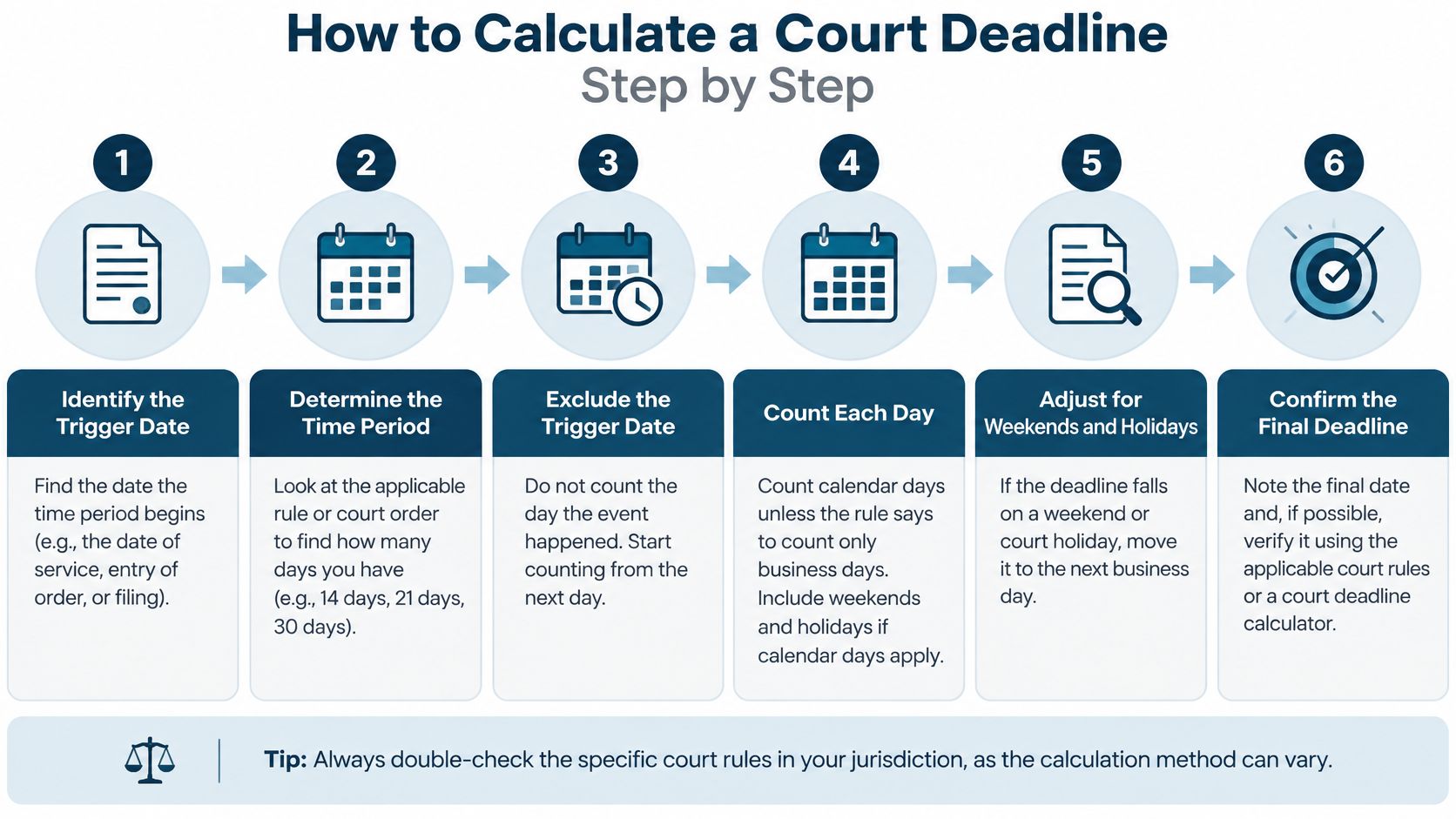
Run the same sequence on every matter. Familiar deadlines cause the quiet failures, because nobody stops to check the assumptions underneath a count they've done a hundred times.
The graphic maps the full sequence. Each step gets its detail below, and the last two steps are what turn a raw count into a date you can defend.
The Eight Steps
Confirm the trigger from the source document: Pull the order, notice, or proof of service that starts the clock. Don't count from a summary email or your memory of a hearing. If the rule runs from service, use service. If it runs from entry, use entry. A wrong trigger makes every later step worthless, even if the math is clean.
Identify the court and governing rule set: Name the jurisdiction, case type, and exact rule that controls this deadline. State rules can differ from federal practice. Local rules can differ again. Write the rule citation into the calendar entry so the next person can check it without hunting.
Choose the counting method the rule uses: Confirm whether the rule counts calendar days, court days, or hours. These aren't interchangeable. A court date calculator set to calendar days will give you a neat, wrong answer on a court-day deadline.
Exclude the trigger day and count forward: Start the day after the trigger under the federal model, then count every intervening day the rule tells you to count. Counting the trigger day is the most common slip I see. It shortens the period by one day and nobody notices until filing day.
Check where the final day lands: If the last day falls on a Saturday, Sunday, or legal holiday, move it under the rule's end-day provision. Don't stop at the raw count. The landing check is part of the calculation, not an extra.
Add any service extension the rule provides: Apply it after the base count and before your final landing check. Adding a service extension twice is a recurring error, especially when a second person reviews the entry and assumes it was missed. Note in the entry that you've already added it.
Set internal warning dates: Put warnings at 14, 7, and 2 days before the operative deadline. The operative date is for the court. The warning dates are for the team. A single reminder on the due date isn't a system. It's a hope.
Record the rule, calendar, and assumptions: Save the trigger source, rule text relied on, holiday calendar used, and any service adjustment beside the date. That note lets another person audit the count in minutes. Without it, review means starting over.
Where Each Step Changes the Result
Take a 10-day period triggered on a Wednesday. You exclude Wednesday, count forward ten calendar days, and land on a Saturday. Under the federal end-day rule, the deadline rolls to Monday, assuming Monday isn't a legal holiday.
Now watch the failure points. Count Wednesday by mistake and you land a day early, which is safe but sloppy. Skip the landing check and you calendar Saturday, a day you can't file the normal way. Use another state's holiday list and a Monday holiday in your court never shows up. Add a service extension that doesn't apply and you drift late.
Practical rule: If the rule says court days, never count it on a wall calendar like a normal date span.
Check the direction too. Some deadlines run forward from an event. Others run backward from a hearing. Before and after are not interchangeable, and a calculator will happily count the wrong way if you tell it to.
The first count gives you a working date, nothing more. It earns its place on the calendar once the trigger is confirmed, the landing day is checked, and the rule behind it is written down where someone else can find it. Until then, treat the number as provisional.
Counting Rules That Change the Final Date
Start with the federal model because many state rules follow its logic. Under Federal Rule of Civil Procedure 6 at Cornell Law, when a deadline is stated in days, the triggering day is excluded, every intervening calendar day is counted, and the final day is included. If that final day falls on a Saturday, Sunday, or legal holiday, the deadline extends to the end of the next day that is none of those.
That rule sounds simple. It wasn't always this way.
What Changed in 2009
Before the 2009 amendments, periods shorter than 11 days generally excluded intermediate weekends and legal holidays, while longer periods counted them. Two counting systems sat side by side. Short deadlines behaved one way. Longer deadlines behaved another way. People got counterintuitive results and they got them often.
The amendments created a single days-are-days method. Every calendar day counts, no matter how short the period. To keep the actual time roughly equal, many former 10-day periods were converted to 14-day periods, because excluding two Saturdays and two Sundays commonly produced a 14-calendar-day span.
But old habits survive. I still see reference tables built on pre-2009 logic sitting in shared drives. Someone grabs one on a busy afternoon and the count is wrong before it starts. Check the date on any counting aid you use. If you can't tell which era it came from, throw it out.
Why Software Needs a Counting Switch
A court date calculator can't run on one universal formula. It needs a jurisdiction setting, a counting convention, and a current holiday calendar for that court. Change any one of those inputs and the same trigger date produces a different deadline. That's not a software flaw. That's the rules working as written.
Check three questions on every deadline:
- What unit does the rule use: days, court days, or hours, because each one counts differently.
- Does service add time: mail service adds days under the federal service provision, and the added days still face the end-day check.
- Which holidays count: the court's own legal holidays, not a generic national list.
| Deadline type | Days counted | End-day rule | Common trap |
|---|---|---|---|
| Federal civil, stated in days (FRCP 6(a)) | Every calendar day after the trigger day | Moves to the next day that is not a Saturday, Sunday or legal holiday | Assuming weekends do not count |
| Federal civil, service by mail (FRCP 6(d)) | Adds three days to the base period | Same end-day rule applies after the added days | Adding the three days twice |
| Federal periods under 11 days, before 2009 | Weekends and legal holidays excluded | Varied by period length | Using old tables on current matters |
| Most state courts | Varies by state rule text | Varies by state rule text | Checking the state rule text before counting |
State courts vary enough that no table can carry the answer for you. Pull the exact state rule text for each state you practice in. Because a date that's correct in federal court can be flat wrong across the street.
Weekends, Holidays and Filing Cutoffs
The end-day roll is only half the job. The last day also has a time limit, and that limit depends on how you file. A date without a cutoff time is an unfinished entry.
Under federal practice, the last day generally ends at midnight in the court's time zone for electronic filing. For other filing methods, it ends at the clerk's scheduled closing time. Two channels, two different endings on the same calendar date.
Midnight Is Not Universal
One federal district tightens that further. Its CM/ECF administrative manual on last-day filing cutoffs states that a document filed before midnight is docketed that day, but time-sensitive filings made on the last day of a deadline must be submitted by 5:00 p.m., unless the court orders otherwise.
Read that again if your team files at night. The system's timestamp says midnight. The local deadline policy says 5:00 p.m. for the filings that matter most. If your reminder fires that morning, you're already squeezed. Fire it hours before the working cutoff, not before the formal one.
| Filing channel | Last-day cutoff | Where the rule comes from | Action to take |
|---|---|---|---|
| Electronic filing in federal courts | Midnight in the court's time zone | Federal filing rules and court notices | Set the internal reminder hours earlier |
| Other filing methods | Clerk's scheduled closing time | Federal rules and local practice | Confirm the clerk's hours before the deadline |
| Time-sensitive last-day e-filing in one federal district | 5:00 p.m. unless the court orders otherwise | Local CM/ECF administrative manual | Treat 5:00 p.m. as the working cutoff |
| State courts | Set by local rule or clerk notice | State and local court procedures | Check the local rule and clerk notice |
Use the Court's Own Holiday Calendar
Holidays cause the same kind of drift. State and local closures can differ from a generic federal list. A clerk's office can also close on a day the court doesn't list as a holiday, for weather, training, or a local emergency.
So check two things, not one. Check the court's published holiday calendar. Then check for closure notices close to the deadline. Preserve the court, district, filing type, and local instructions in the calendar entry. A calculated date alone won't tell the next person any of that.
When a Calculated Deadline Moves
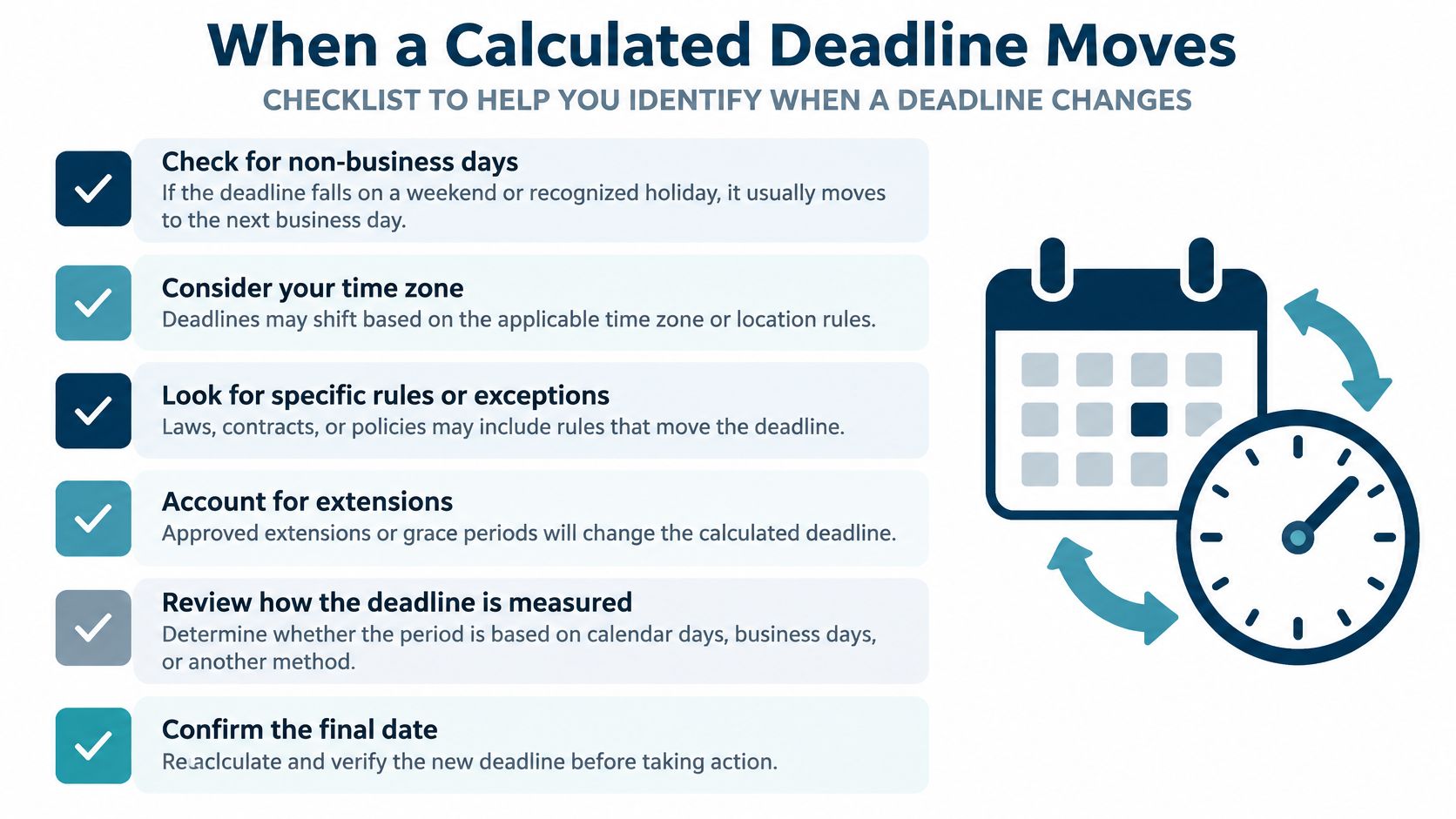
A calculated date is a working date, not a final one. Treat it as final and you'll miss the change that matters.
Deadlines move after amended orders, continuances, stipulated extensions, settlements, court closures, and docket corrections. Case schedules also shift when courts issue or revise case management orders that reset matter deadlines. A basic calculator returns one static date and misses all of it. It has no way to know the court acted last night.
An Outage Is Not an Extension
The Federal Circuit notice on electronic filing outages and deadlines states that its electronic filing system may be unavailable during scheduled maintenance. It also warns that filing deadlines are not automatically extended unless a specific notice says so.
Don't assume a broken system buys you time. It doesn't. Save outage notices and timestamped screenshots when a system fails near a deadline. Those records matter if you later have to show what happened and when.
A Daily Drift Routine
- Compare every new court notice with the stored date: Don't file the notice away before you check it against the calendar.
- Log each change: Record the new date, the source document, and the person who made the change. Versioned deadlines beat overwritten ones.
- Escalate conflicts the same day: If a later order disagrees with your calculated date, raise it now, not at the next status meeting.
- Confirm each filing with a receipt: A sent confirmation isn't the same as an accepted filing. Keep the proof with the matter.
- Keep a backup filing plan: High-risk matters need an alternate method ready before the primary one fails.
Reliability depends less on producing the first date than on catching the second one.
The calculated date is only as good as the monitoring behind it. Watch the authoritative docket, preserve the notices, and record the assumptions you used. That's what turns a calculator output into a deadline you can stand behind.
Quality Checks, Reminders and Final Confirmation
Checks aren't busywork. An insurance analysis cited by the Texas Lawyers' Insurance Exchange on scheduling errors found that identifiable administrative scheduling errors were the primary cause of 13.25% of claims in its historical dataset. Failure to know or ascertain deadlines was separately classified at 15.24% of claims in that dataset.
Read those figures as claim classifications, nothing more. They say nothing about calculator accuracy, and they aren't a software success rate. Their use is narrower: a produced date still needs human review before anyone relies on it. Teams that skip that review repeat the pattern behind manual legal calendaring as a malpractice risk.

Test the Boundary Cases
Run your process, and any court date calculator you use, against hard cases before you trust it on live matters:
- Trigger dates on weekends and holidays: These expose trigger-day and landing errors fast.
- Month ends and leap days: Short months break rough mental math.
- Short periods: Small counts leave no room to absorb a one-day slip.
- Service extensions: Confirm added days land once and face the end-day check.
- Amended orders: Confirm the new date replaces the old one everywhere it appears.
Compare each output with authoritative court guidance. A tool that can't show the rule, calendar, and assumptions it applied can't be audited. It also can't be corrected quickly when the court changes the schedule.
Confirm Before the Date Goes Live
Set a two-layer reminder. The operative deadline gets its own alert. Internal warnings get separate alerts ahead of it. Then, before any date reaches the calendar, check it against the rule text and the current docket, record the rule and trigger source beside it, assign one owner, and set the warning dates. A calculated date is a working date. It stays under review, documented and owned, until the deadline passes.
Require independent review for appeals and dispositive motions. A second person counts from the source documents, never from your entry. Don't copy holiday lists from another state. That shortcut has caused more quiet errors than bad arithmetic ever will.
Finish with a live test. Run five recent matters through the eight steps and compare your results with the live docket. Any mismatch shows you exactly where the process leaks. Fix that step, then test again.
If you use a platform, confirm its court and rule coverage in a demo, especially for Canadian courts, and check that it logs the rule it applied. CalendarRules tracks trigger dates across North America with 2,200+ rule sets, auto-calculates deadlines with weekend and holiday adjustments, and updates calendar events automatically when a court updates its rules. MatterAlert's docket availability and rule coverage still vary by court and jurisdiction, so confirm your specific courts during that demo.
MatterAlert gives your team rule-based date calculations, calendar synchronization, notifications, task escalation, and event-level audit logs to help reduce missed-deadline and malpractice risk. If your deadlines still live in spreadsheets and memory, visit MatterAlert and book a demo to confirm coverage for the courts you file in.