

The court has amended an order. Your paralegal updated the matter file, but the attorney's calendar still shows the old date. Meanwhile, the person who normally checks docket notices is leaving, and nobody has confirmed who takes over.
That's the problem a case management company should help you control. Not just storing dates, but proving that changed dates reach the right people and that someone remains accountable. Before you compare dashboards, test what happens when the original plan breaks.
What a Case Management Company Actually Handles
A legal case management company keeps the dates, tasks, documents, and records for each matter together so attorneys, paralegals, and docketing staff agree on what's due and who owns it. Some firms buy software and run the process themselves. Others hire a service team to perform defined operational work.
Those are different purchases. Software supplies the workspace and controls. A managed service adds people who perform agreed tasks, but your engagement terms still need to say who verifies deadlines and resolves exceptions.
The legal case manager's role helps clarify that division. Someone must connect the court notice, the matter record, the assigned work, and the responsible attorney. Buying a platform doesn't automatically assign that responsibility.
Core service areas and the risk each one controls
| Service Area | What the Company Handles | Risk if Missing |
|---|---|---|
| Deadline calculation | Trigger dates, court rule sets, weekend and holiday adjustments | Missed or miscounted deadlines |
| Docket monitoring | New filings, court notices, and case events | Late awareness of orders and notices |
| Matter records and documents | Central file, linked documents, and access permissions | Lost or scattered files |
| Task assignment and escalation | Task owners, due dates, reminders, and escalation of overdue work | Unclear ownership after staff changes |
| Calendar synchronization | Attorney and staff calendars kept aligned | Conflicting or outdated dates |
| Time capture and reporting | Billable, non-billable, and pro bono time by matter | Unbilled or unreported work |
| Audit logs | Record of who changed what and when | Hard to reconstruct what happened |
Docket monitoring and deadline calculation aren't interchangeable. Monitoring identifies a new filing or order. Calculation applies the relevant rule to a confirmed trigger. A provider can perform one well while leaving gaps in the other.
Say your litigation team handles a federal case in one state and a state-court case in another. Similar events can produce different deadlines because different procedural rules govern them. Copying an event template without checking the governing court can reproduce the wrong assumption across both matters.
Time capture belongs in this discussion too. The person completing a task should be able to associate the work with the correct matter rather than reconstruct it from email later. But easy time entry won't compensate for weak docketing.
Buying rule: Define the work before selecting the tool that will hold it.
Before reading a proposal, answer these questions:
- Existing ownership: Which functions already run reliably in-house?
- Current failures: Where do notices, assignments, or updates get lost?
- Future responsibility: Who will own each function after launch, including exceptions?
Why Missed Deadlines Drive Malpractice Claims
Deadline and filing failures deserve attention because they appear in professional-liability claims, not merely in software demonstrations. A 2025 Minnesota Lawyer review citing American Bar Association and insurer data identified recurring claims-related activities involving document preparation and transmission, commencing proceedings, advice, pretrial or prehearing work, and settlement negotiation.
The review described substantive errors as the largest alleged category, followed by administrative errors. Those administrative failures included improper calendaring, clerical mistakes, failing to react to a calendar, undocumented deadlines, procrastination, and lost files.

A reminder addresses only part of that list. If the date is wrong, an early reminder gives the team more notice of the wrong deadline. If nobody owns the work, sending another email doesn't resolve the assignment.
Match each failure to a control
Use the claim categories to build a written control map:
- Improper calendaring: Require a verified trigger, applicable rule, and reviewer before treating a deadline as approved.
- Clerical mistakes: Keep the underlying notice attached so another person can check the entry.
- Failure to react: Escalate incomplete work to someone with authority to intervene.
- Undocumented deadlines: Require a matter-linked record instead of relying on an attorney's private calendar.
- Procrastination: Assign preparation milestones before the filing obligation.
- Lost files: Keep the operative document with its related event and task.
Consider a clerk entering a trigger date from an emailed order. The court later amends the order, but the new notice lands with someone who assumes the clerk has already handled it. The calendar remains unchanged.
Nobody necessarily misunderstood the original rule. The failure occurred when the amendment arrived and no one reconciled it against existing obligations.
A date isn't controlled just because it appears on a calendar.
The practical response is an amended-order workflow. Assign someone to review the new notice, identify affected obligations, obtain approval for changes, and confirm that responsible staff received them. Keep unresolved questions visible until counsel decides them.
Ask every shortlisted case management company to map each administrative failure category to a named control in writing. Reject answers that stop at “we send reminders.” You need to know who handles exceptions, what evidence remains, and how the firm detects unfinished work before the filing window closes.
How Court Deadlines Get Counted, Step by Step
Simple date arithmetic isn't enough for court work. You must identify the governing rule before you count, then check whether an order or another applicable provision changes the result.
Federal Rule of Civil Procedure 6 excludes the triggering day for day-based periods, counts intervening calendar days, includes the final day, and extends a period ending on a Saturday, Sunday, or legal holiday to the next qualifying day. It also ordinarily sets electronic filing's cutoff at midnight in the court's time zone and lists holidays including Memorial Day, Juneteenth, and Veterans Day.
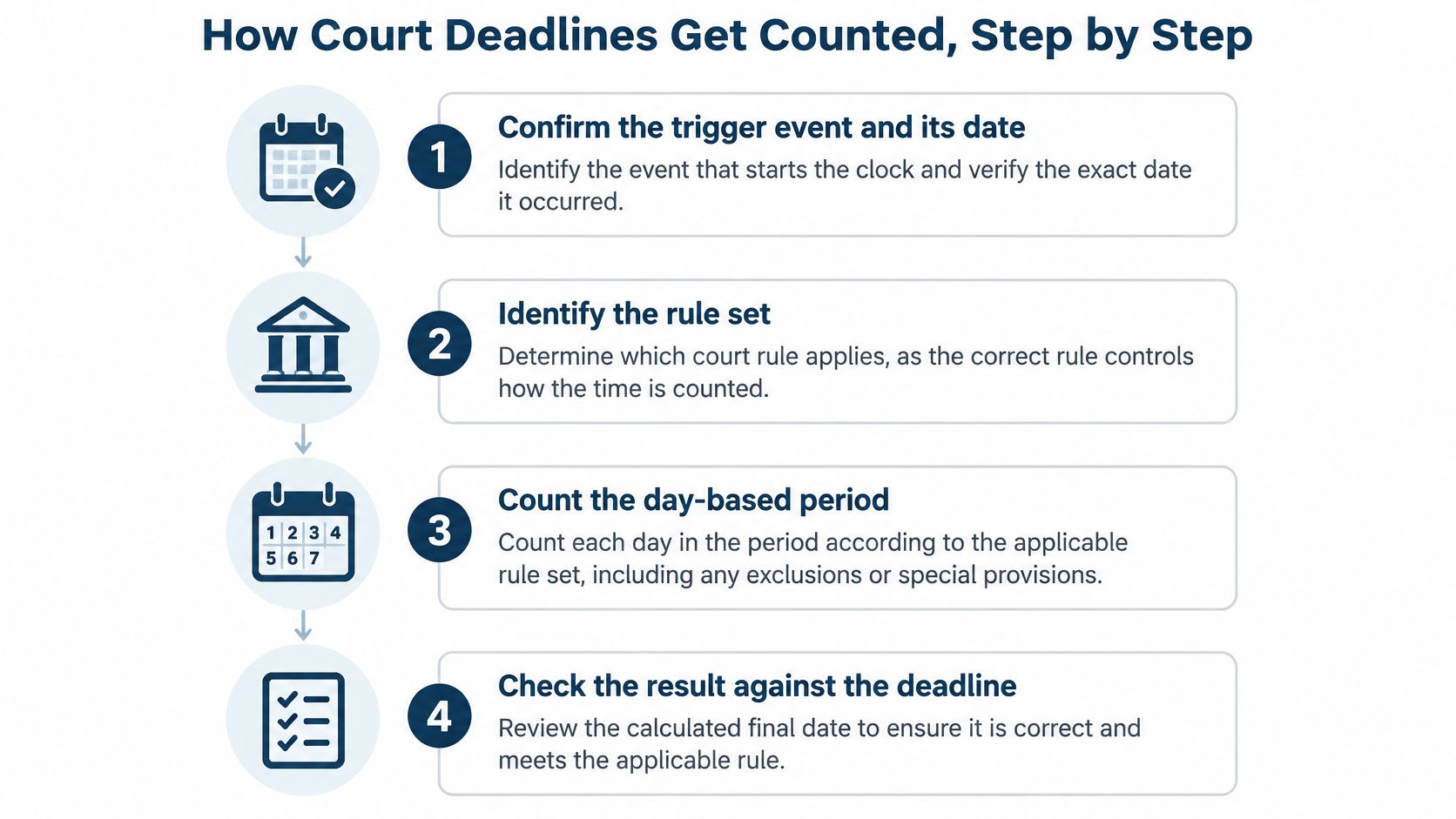
Build a calculation someone else can verify
Confirm the trigger event and its date. Read the operative filing, notice, or order. Don't assume the date an email arrived is the legally relevant starting point.
Identify the governing rule set. Match the court, case type, and procedural event. Review any controlling order before accepting a standard calculation.
Exclude the trigger day where this method applies. Starting the count on the event date changes the result before holiday adjustments even enter the picture.
Count the intervening calendar days. Don't switch to business days because staff don't work weekends.
Include the final day and inspect it. Check the applicable weekend and holiday treatment rather than relying on the appearance of a calendar entry.
Apply the required extension. If the last day is disqualified, continue to the next day permitted by the governing rule.
Confirm filing method and cutoff. Record the court's time zone. A remote attorney's local clock isn't a substitute.
Preserve the calculation inputs. Save the trigger, counting method, holiday calendar, filing method, and reviewer with the resulting obligation.
For a hypothetical day-based period ending on Sunday, this method moves the deadline to Monday unless Monday is also a legal holiday. The key isn't memorizing that example. It's retaining enough information to explain why the final date changed.
Test the method, not just the answer
A correct date can conceal an incorrect setup. During a demonstration, ask the operator to show the selected trigger and rule, not merely the calendar result.
Attorney Assistant's resource on keeping court calendars on track offers useful context for organizing the surrounding tracking process. Our explanation of automated docketing also helps distinguish incoming court activity from the work required to turn it into an assigned obligation.
Test a provider against familiar matters whose answers counsel has already verified. Include an ordinary period, a holiday adjustment, and a court-specific exception. A mismatch should produce an explanation and corrective action, not a request to trust the automation.
Audit Trails and Access Controls to Test
A deadline record is useful only if the firm can reconstruct what changed, who changed it, and why. During a demo, change a deadline and inspect its history. If the record shows only the current date, it cannot explain how the team arrived there.
NIST's security requirements describe audit records that support monitoring and investigation, identify events and responsible users, and protect audit information from unauthorized changes or deletion. Turn those principles into an acceptance test for legal workflows.
A useful deadline entry should show who acted, when, what changed, the original and replacement values, the source system, and the outcome. It should also distinguish a manual correction from a recalculation or an integration update.

Controls to verify and evidence to request
| Control | What to Verify | Evidence to Request |
|---|---|---|
| Event-level audit log | Actor, timestamp, before and after values, and outcome are recorded | Export of the log for one changed deadline |
| Role-based access | Users see only the matters and documents their role allows | Permission matrix by role |
| Ethical walls | Blocked users cannot open or calendar conflicted matters | Test account results from a live demo |
| Log protection | Regular users cannot edit or delete audit records | Administrator permission settings |
| Retention settings | Logs and matter records are kept for the required period | Retention schedule and export options |
| Ownership transfer | Bulk reassignment updates tasks and events across matters | Demo of reassigning one departing attorney's matters |
| Sync and integration failures | Errors are logged and sent to a named owner | Sample alert and escalation record |
Test permissions and logging together. A user blocked from a conflicted matter should not gain access, and the firm should be able to review the access attempt. A detailed log offers little protection if ordinary users can alter it.
NIST's draft log-management guidance covers log generation, transmission, storage, access, and disposal. Apply those stages when checking records for authentication, privileged actions, matter access, document operations, deadline changes, integrations, and exports.
Make the records useful in a dispute
Set retention rules to match the firm's obligations and written policies. Confirm who can export records, who can administer retention, and how the system reports a logging failure. An undocumented administrator workaround is not a retention plan.
MatterAlert provides rule-based date calculations, calendar synchronization, notifications, task escalation, and event-level audit logs to help reduce missed-deadline and malpractice risk. It logs changes at event and matter levels, with reports by timekeeper, matter, client, or office, custom report formats, and dashboard analytics.
MatterAlert lists SOC 2 compliance, Microsoft 365 single sign-on, Azure AD user provisioning, role-based access, and event-level and matter-level audit logs. Use the MatterAlert security features as a starting point, then verify their behavior in the pilot. A feature description is not evidence from your workflow.
Track operational exceptions that someone can investigate:
- Access problems: Failed access attempts grouped by user.
- Assignment anomalies: Unexplained bulk reassignment.
- Integration faults: Synchronization errors awaiting resolution.
- Approval gaps: Critical deadline changes without a named approver.
Finish with a practical test: change a deadline's trigger date, export its history, and confirm the original value, replacement value, and responsible user are visible. Ask someone other than the operator to explain the change using only that record.
Matching a Provider to Your Firm and Courts
Start with your firm's operating profile, not the longest feature list. A small practice may need repeatable setup and dependable reminders more than complex reporting. A multi-office litigation firm needs to control access and assignments across teams without losing the central view.
MatterAlert suits solo and small firms that want repeatable matter templates, shared calendars, and reminders without desktop software. For larger firms, we provide centralized views, delegation, bulk reassignment, ethical walls, and integrations with accounting and document systems.
Firm profile and what to confirm
| Firm Profile | Main Need | What to Confirm |
|---|---|---|
| Solo or small firm | Repeatable templates, shared calendars, and reminders without desktop software | Per-user licensing and template setup time |
| Litigation firm in several U.S. states | Rule sets for each court and docket monitoring | Rule coverage for each court named in the demo |
| Firm with Canadian matters | Jurisdiction coverage and docket access | Which Canadian courts and rule sets are supported |
| Large multi-office firm | Central views, ethical walls, and bulk reassignment | Integrations with accounting and document systems |
| Firm using iManage or NetDocuments | Linked documents and matching permissions | Workspace and document-level permission behavior |
Our docket availability and rule coverage vary by court and jurisdiction, especially in Canada. Confirm the actual courts and rule sets during the demo rather than accepting a country-level coverage statement.
We integrate with iManage and NetDocuments. Our iManage integration honors workspace-level and document-level permissions. Test a restricted document using an account outside the matter, including access through an event or task link.
Separate software costs from retrieval and staffing
PACER's fee guidance sets access at $0.10 per page, generally capped at $3.00 per document or case-specific report, equivalent to 30 pages; a 10-page docket report costs $1.00, and charges totaling no more than $30 in a quarterly billing cycle are waived. The cap excludes transcripts, name-search results, and certain non-case-specific reports.
Ask how monitoring uses date ranges and targeted docket entries to avoid unnecessary retrieval. Keep court-access charges separate from subscription fees so you can understand what changes when matter activity increases.
Our licensing covers users who access the application or receive calendar synchronization. Get a written cost model identifying applicable add-ons and charges, with a hypothetical invoice for a team managing a defined sample of matters.
If the staffing gap is the issue, HireParalegals' comparison of the best virtual legal assistants companies can help frame that separate decision. Extra staff can process notices, but they still need defined authority and review procedures.
Before a demo, settle the buying questions: Which courts are covered, how are deadlines calculated, and what will usage cost?
Run a Pilot Before You Sign a Contract
Shortlist a small group of providers and make each demonstrate the same operating conditions. A polished presentation won't tell you whether the system handles an amended order or a departing attorney correctly.
Use real matters only after approving the pilot's confidentiality and access arrangements. Where that approval isn't available, use sanitized copies that preserve the procedural facts without exposing client information.
Put changes into the pilot deliberately
Choose contrasting matters. Include a straightforward matter, a cross-jurisdictional matter, and one with a planned staff change. Write down the expected behavior before the provider configures them.
Validate the calculations independently. Have counsel or a senior docketing clerk prepare the manual answers. Compare every generated obligation, including its trigger and rule selection, rather than checking only the nearest filing date.
Reassign the work. Transfer tasks and events to the replacement attorney. Verify that the recipient can act, the departing attorney's access is handled appropriately, and subscriber calendars reflect the intended ownership.
Introduce an amendment. Change an operative trigger and run the audit test. Give the exported history to a reviewer who didn't perform the change and ask them to reconstruct it.
Record coverage gaps. Confirm every jurisdiction used in the pilot. Document unsupported courts, manual steps, and the person responsible for each workaround.
Approve the implementation agreement. Put onboarding responsibilities, data validation, training, implementation timing, and support commitments in writing. Name the support contact and escalation route.
Keep a discrepancy register throughout the exercise. Record the expected result, actual result, explanation, correction, and retest outcome. Don't mark a problem resolved because someone promises a future fix.
Choose the provider that passes the change tests, not the provider that gives the smoothest demonstration.
Make support part of acceptance
We should face the same pilot as every other vendor. PaayaTech provides a dedicated project manager and 90 days of enhanced post-launch support. Put the practical arrangements for that support into the implementation agreement.
Clients can use our support portal to explore the knowledge base, product documentation, and training resources, and submit support requests directly. During onboarding, have the people who will report problems practice using it.
The decision rule is straightforward: choose the provider whose pilot deadlines match counsel's manual calculations and whose audit records remain understandable after a tested change. Leave unresolved exceptions open until someone accepts responsibility for them in writing.
MatterAlert brings rule-based calendaring, docket access, assignments, and audit records into a matter-centered workspace. Visit MatterAlert to arrange a demo using your courts, a changed deadline, and an ownership transfer so you can test the process before committing.