

A court notice arrives late in the day. It moves a filing date. One calendar shows the new date. Another still shows the old date. The task owner is on leave, and no one is sure who approved the change. This is the daily problem behind legal workflow automation. Speed matters, but reliability and accountability matter more.
Why Legal Teams Need Connected Workflows
A partner asks a simple question on Monday morning. She wants the current deadline for a response. The docketing clerk gives one date. The associate gives another date. The paralegal finds a third date in an email thread. Each person worked carefully. The systems around them did not agree.

Symptoms point to one cause
Missed dates get the most attention. Duplicate entry and unclear ownership cause quieter damage. Staff retype matter data into calendars, documents, and billing tools. A reassigned task stays on the wrong person's list. A reminder fires, but no one can see if the work is done.
These failures share one cause. Information and actions sit in disconnected systems. An EY study reports that 52% of legal teams cite disorganized data, 44% cite disconnected legal and business systems, and 41% cite limited access to accurate data as technology challenges in the EY general counsel study on legal technology challenges. Automation that only creates reminders does not fix that split.
What good coordination looks like
A connected workflow keeps one matter record at the center. Deadlines, tasks, documents, and owners read from that record. When a date changes, related tasks and calendars change with it. When ownership changes, the new owner sees the full history. Teams building stronger legal operations management practices usually start with this shared record, not with a new reminder tool.
- One source for dates: Staff check the matter record first, not personal calendars.
- Visible ownership: Every task shows a named owner and a backup.
- Change history: Each edit shows who made it and when.
- Exception path: Conflicts go to a queue, not to an inbox.
Practical rule: Test the messy case first. Change a date, reassign the owner, and break the sync. A workflow that handles only the normal path is not ready.
Treat automation as an operational reliability project. Ask who owns each step. Ask which system controls the date. Ask how the team proves a change was correct. Those answers decide whether automation helps or just moves errors faster.
How Legal Workflow Automation Works
A paralegal leaves on a Thursday. Her replacement opens the matter Friday morning and finds fourteen open tasks, two deadlines shifted by a new court order, and no record of who approved the last date change. Whether automation helps or hurts that morning depends on how the workflow was built, not on whether it exists.
A chain of events, not a feature
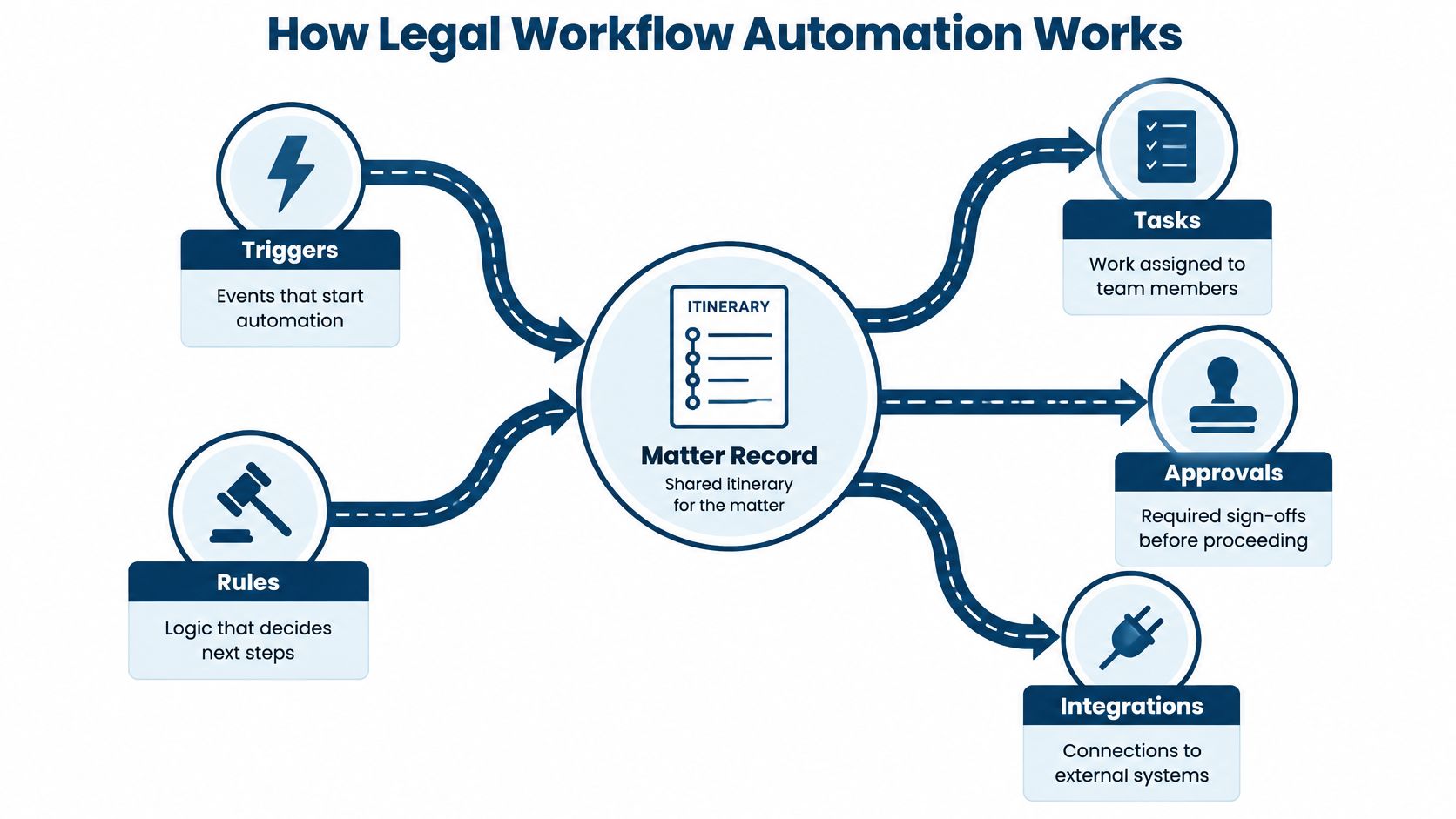
Legal workflow automation runs as a chain. A trigger fires: a court notice arrives, a matter opens, a document is uploaded. A rule evaluates that trigger and picks the next step, whether that means calculating a date, assigning work, or routing it for review. A task carries the human work, an approval holds the chain until the right person signs off, and integrations push the result to calendars, document systems, and time tools.
Every link in that chain writes to an audit record. The record shows what fired the trigger, which rule ran, what inputs the rule used, and who approved the output. That log is what turns automation into an accountability system. When a deadline is later disputed, the firm answers from the log, not from memory.
Built on layers that already exist
Automation connects three layers, and each one has limits:
| Layer | What it does | Where it falls short |
|---|---|---|
| Digitization | Moves filings, documents, and research into electronic systems | Stores data but does not act on it |
| Rules based automation | Applies fixed logic to dates, tasks, and reminders | Breaks quietly when inputs are wrong or missing |
| AI assistance | Supports drafting, search, and summarization | Needs human review before anyone relies on output |
The first layer is already in place at most firms. The ABA reported that 73% of firms used cloud based legal tools and 85% of litigators used electronic court filings in its 2025 summary of ABA legal technology survey trends. Automation starts from that base, connecting systems that already hold matter data rather than replacing them.
Design for the day it goes wrong
No single product covers every jurisdiction or practice group. Court rules differ, matter types differ, and approval habits differ across offices. A sound design keeps one stable chain of events and lets local rules vary around it.
Plan for failure states explicitly. An integration drops and a calendar falls out of sync. An owner leaves mid-matter and her queue has no backup. A rule runs on a stale input and produces a wrong date. Each case needs a defined path to a human, and each fix needs its own entry in the record. A workflow you can explain beats a feature you cannot trace.
Automating Court Deadlines Reliably
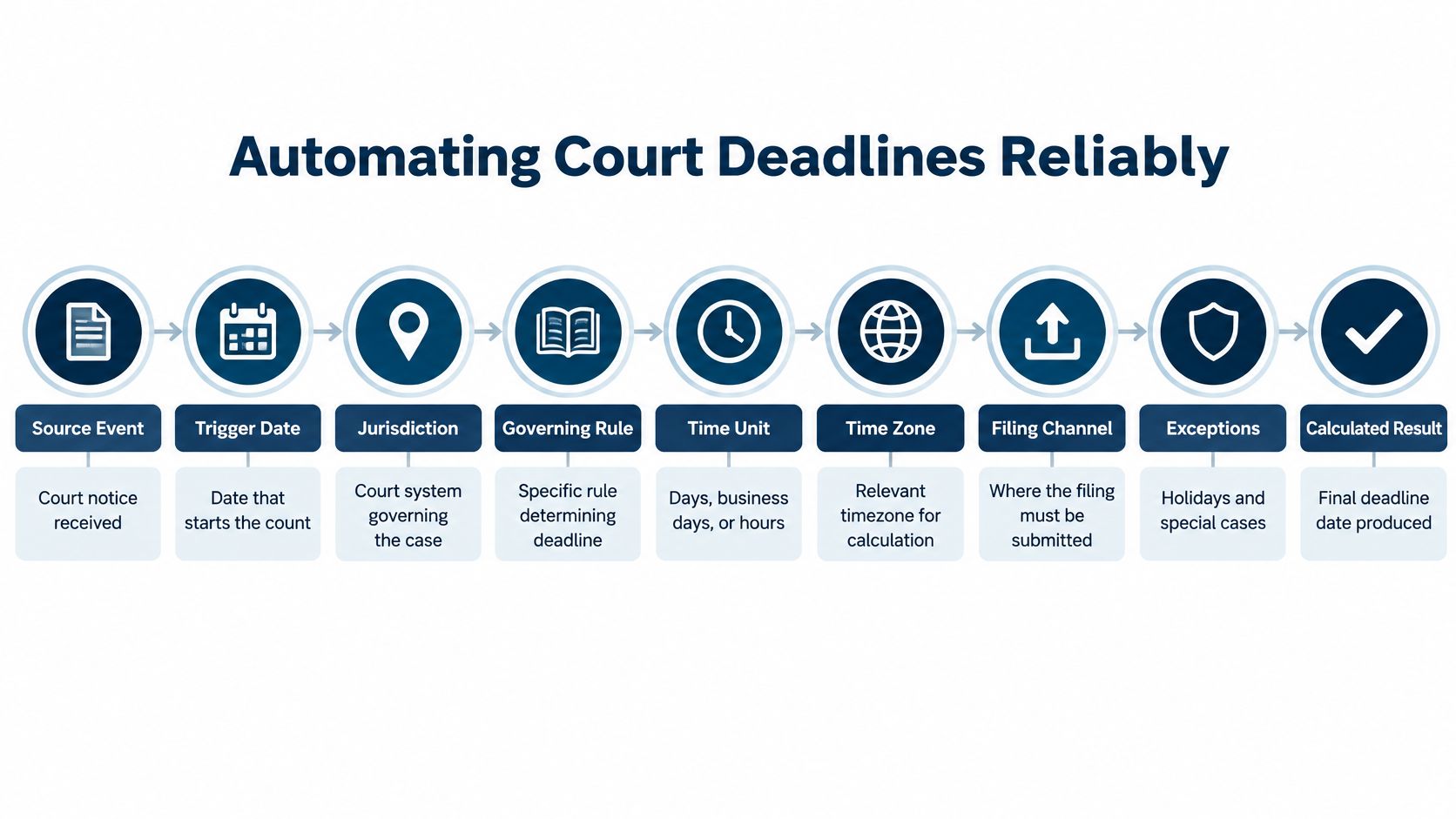
A court order arrives on a Tuesday afternoon and gives the defendant fourteen days to respond. A paralegal enters the order date as the trigger. The system selects the jurisdiction and the governing rule, calculates the due date, and routes the result to an attorney, who confirms it before anyone relies on it.
What the record has to hold
That calculation is only as reliable as the context stored with it. The record needs the triggering event and its date, the court, the jurisdiction, the rule version in effect, the time unit, the time zone, the filing channel, the weekend and holiday adjustments, and the source of any exception. Drop one and the date on the calendar becomes a guess no one can audit later.
Under Federal Rule of Civil Procedure 6(a)(1) on computing time, the triggering day is excluded, intermediate days are counted, and a deadline ending on a Saturday, Sunday, or legal holiday moves to the end of the next qualifying day. So the count starts the day after the order, and staff should never count the order date itself. If the last day lands on a weekend, the date rolls forward.
Electronic filing does not stretch the period. The final day ends at midnight in the court's time zone unless a statute, local rule, or court order says otherwise. That detail matters for teams filing from other zones, and the docketing record must keep the court's zone rather than the filer's.
Calculation is a plan, proof is a record
A calculated deadline is a plan. A filing receipt is proof, and teams confuse the two at their peril. The workflow should keep both, linked to the same event, and firms that understand why manual legal calendaring creates malpractice risk usually tighten this link first.
The lifecycle then runs the same way on every matter. The engine calculates and records which rule version it applied. An attorney confirms the trigger, the rule, and the result. Reminders go out early enough to cover drafting, client approval, and final checks. Staff file through the correct channel before the cutoff, and the team attaches the filing notice, the timestamp, the user, and the document version. The item closes only when that evidence exists.
Local rules and court orders can still override the defaults. One federal procedure can use midnight for initial pleadings and an earlier cutoff for later filings. The system must let staff record that exception source and flag the change for review instead of recalculating.
If filing confirmation never arrives, escalate the item. An open deadline with no evidence attached stays open, and that standard protects the client and the team.
Choosing the Best Processes to Automate
Not every slow process deserves automation. Some need clearer policy. Some need cleaner data. Some need a decision that no rule can make. Five practical tests sort the candidates fast.
Five tests for a candidate workflow
Check frequency first. Daily work repays setup effort. Check consistency next. Steps should repeat in a stable order. Then check rule complexity, data quality, and the cost of failure.
Efficiency drives most interest. In the ABA's 2024 survey, 54.4% of respondents selected saving time or increasing efficiency as the leading perceived benefit, while 9.1% selected document management or review and 4.5% selected cost reduction, per the ABA 2024 artificial intelligence tech report. Time savings alone should not pick the first project. Reliability should share the decision.
Automation Suitability by Workflow
| Workflow | Strong Starting Signals | Risks to Resolve | Human Control Needed |
|---|---|---|---|
| Deadline calculation | Clear trigger and written court rule | Local exceptions and wrong trigger dates | Attorney confirms rule and result |
| Task creation from templates | Repeatable matter types | Template drift over time | Owner reviews assigned steps |
| Court docket monitoring | Regular notices and filings | Missed or duplicate notices | Staff verify new events |
| Calendar updates | Frequent date changes | Failed or partial sync | Owner checks conflicts |
| Document handling | Standard forms and fields | Wrong version or client data | Reviewer approves final draft |
| Ownership changes | Known backup roles | Orphaned tasks during turnover | Supervisor approves reassignment |
| Time capture and reporting | Tasks already tracked in system | Poor task codes and late entries | Timekeeper confirms entries |
Repetitive work with clear inputs makes the best start. Judgment heavy work with unclear inputs makes a poor one. A workflow that speeds one step but breaks ownership is not progress. Look for the chain, not the shortcut.
Say no when the base is not ready. Dirty source data will produce fast, confident errors. Unclear policy will create disputes the system cannot resolve. Fix those gaps first, and automation will have something solid to run on.
Practical Examples Across Legal Operations
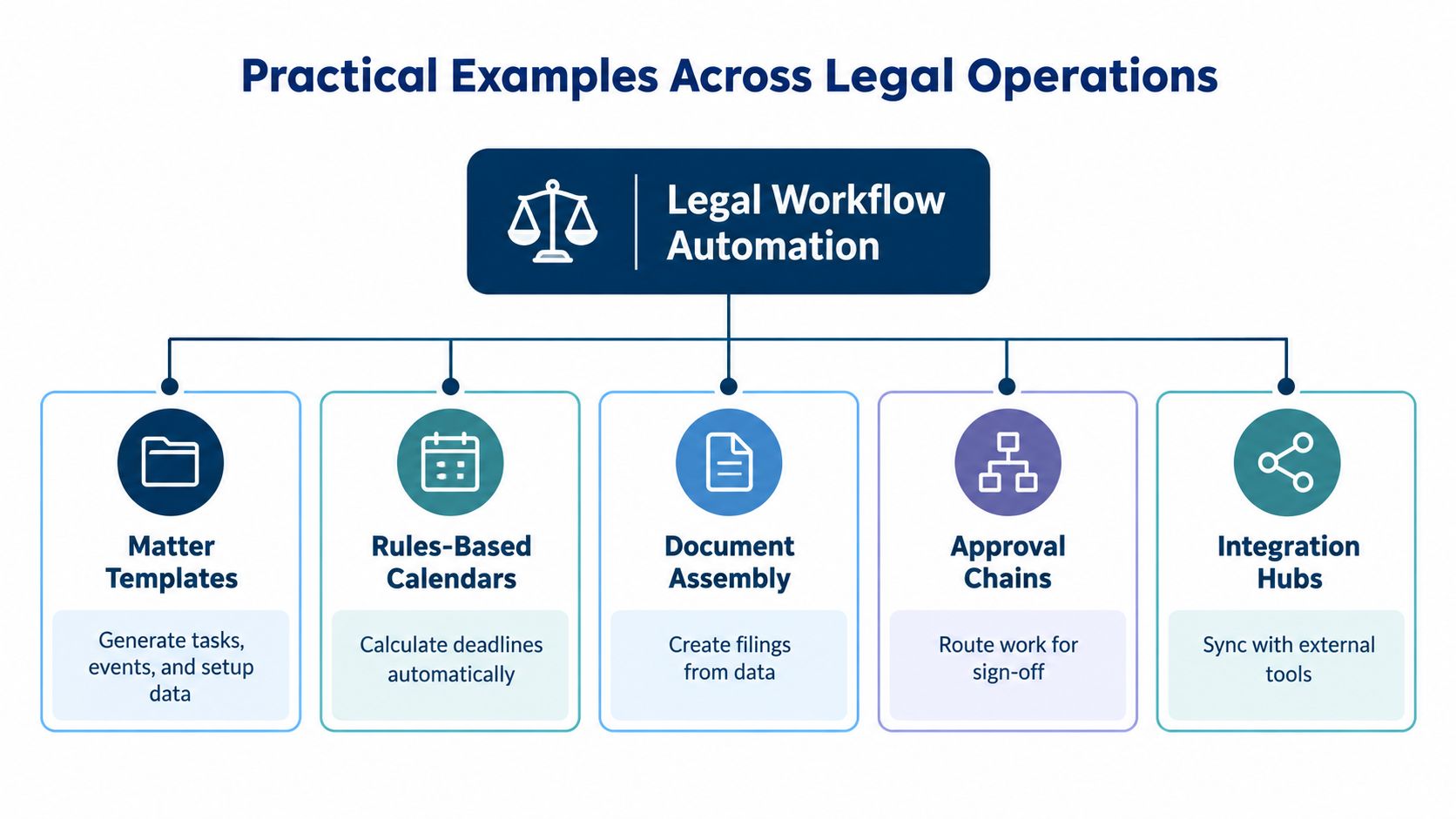
Daily work shows whether automation is real. The examples below follow one pattern. Each has a trigger, an automated action, a retained record, an exception path, and an accountable owner.
Templates and rules based calendars
A new litigation matter opens. Staff pick a matter template for that case type. The template creates setup tasks and standard events. It also requires key fields, such as court and opposing counsel. If a required field is missing, the matter stays in a setup queue. The intake owner clears it.
Deadline calculation follows the same discipline. MatterAlert uses more than 2,200 court rule sets to calculate deadlines from trigger dates, with adjustments for weekends and holidays, and it synchronizes calendar changes to Outlook within one minute. The record keeps the trigger and rule set. If a court order changes the date, staff enter the exception and an attorney approves it. Subscribed calendars then update from the same record.
Reassignment, escalation, and visibility
Staff turnover breaks manual tracking fast. A departing assistant may own tasks across many matters. Bulk reassignment moves those tasks and events to a new owner in one pass. The audit log keeps the old owner, new owner, and date of change. A supervisor reviews any item without a backup.
Incomplete work needs a visible path too. Escalation rules flag overdue tasks to a supervisor. Task boards show work by owner and status. Workload reports expose uneven caseloads before they become missed dates. The accountable owner stays named at every stage, so escalation supports the person instead of blaming them.
Integrations close the gaps
Matter data should not live in one silo. Integrations can connect the workflow with Microsoft 365, iManage, NetDocuments, Elite, or Aderant. A document saved in the document system links to the matter. Time captured from a task flows toward billing review. Calendar users keep working in Outlook.
- Trigger: A task completes or a document is filed.
- Action: The linked system receives the update.
- Record: The matter keeps the document link and event history.
- Exception: A failed sync lands in a review queue.
- Owner: IT and docketing share a named contact for failures.
Each example saves typing, but that is not the main gain. The gain is a chain the team can inspect. Anyone can see what started the work, what the system did, and who owns the next step.
Assess Security and Exception Management
Friday, 4:50 p.m. A court rule update shifts a response deadline. The recalculation runs, tasks regenerate, and the sync to Outlook fails. If nobody spots that failure before Monday, a wrong date sits on every attorney's calendar. Login protection does nothing here. Security and exception handling decide whether the error gets caught while it is still fixable.
Access controls come first because the workflow system concentrates client data, deadlines, and documents in one place. Least privilege access is the base rule, with permissions layered across organization, office, and matter. Ethical walls need their own controls. Document and event level limits apply to sensitive matters. Delegated calendar access expires and stays revocable.
NIST guidance on identity and access management calls for issued and managed identities, separation of privileged access, protected audit infrastructure, restricted log access, and unique accountability for access events. Applied to a legal workflow, every sensitive action writes a log event: deadline edits, exports, permission changes, admin overrides. Each event records the actor, role, time, target, and the prior and new values. Then protect the log from the people it monitors. Restrict read access, block edits and deletion, and export to an independent security system where possible. A user without matter access should see no leaked metadata, not even a document title.
Review question: Can you reconstruct who changed this deadline, from what source, and with whose approval? If not, the workflow isn't controlled yet.
Match the control to the failure mode
Each kind of step fails differently, so each needs a different gate.
| Step type | Typical failure | Control that catches it |
|---|---|---|
| Manual | Delay, inconsistency | Escalation rules and owner visibility |
| Rules based | Wrong input, stale court rule | Validation against jurisdiction data, change approval |
| AI assisted | Plausible but wrong output | Attorney review before the result applies |
Set the approval threshold by consequence, never convenience. Anything that moves a deadline deserves the strictest gate, because a silent error there reaches calendars and commitments before anyone questions it.
When failures do occur, routing matters more than prevention. A trigger date will be wrong. A sync will fail. A deadline will change after tasks are assigned. Route each case to an exception queue with a named owner and a due time, and track acknowledgment rates and unresolved exceptions as standing metrics. A failed sync that lands in a queue a docketing clerk watches gets fixed. One buried in an IT error log does not.
In reviews, press on the hard questions. Which system controls the date when records conflict? Which changes require attorney sign-off? Where do failed syncs appear, and who clears them? How do tasks move during leave? Can staff rebuild each action from logs and receipts?
Plan the Implementation and Control Rollout
Treat rollout as a chain of custody for work. Every automated step should leave evidence: who owned it, what rule fired, which record changed, and who approved the result.
A launch can look stable for weeks and still be weak. The test is an ordinary bad day: a paralegal goes on leave, a court posts a revised rule, and calendar sync drops one matter. If ownership, permission scope, and rollback were rehearsed, the day stays noisy yet controlled. If those answers live in one administrator's head, the pilot is only a demo.
Before production, assemble a small evidence pack. Map the current steps and name the person who can stop each one. Clean duplicate clients, stale owners, and closed matters that still trigger work. Check jurisdiction rules against live files, run calendar and document integrations with near real cases, and prove that role-based access hides what it should hide.
Then rehearse the breaks before the happy path. Change a deadline after tasks exist. Reassign a matter midstream. Kill a sync and watch where the failure lands. I want the team to restore service with records, logs, and receipts.
Governance needs the same early attention. A 2025 Thomson Reuters survey of more than 1,700 legal professionals reported AI adoption of 28% in law firms and 23% in corporate legal departments, with respondents stressing policies, training, client discussions, and outcome measurement in the Thomson Reuters generative AI report summary. Put that discipline around every automated action: approval tiers, readable rules, role-specific training, and a narrow pilot group.
Expansion earns its way out. Hold the pilot until exceptions are explainable, ownership transfers cleanly, and attorneys can defend each output later. Widen only when a new group inherits controls that already survived a bad day.
Use a Practical Automation Readiness Checklist
A firm is ready when the basics hold. Processes repeat in a stable way. Source data is accurate enough to trust. Owners are named, rules are documented, and permissions work in daily practice. Security also needs a sober look. The ABA reported that 25% of respondents to its 2021 Legal Technology Survey said their firms had experienced a data breach, in its ABA report on cybersecurity in law firms.
- Start now: The workflow is repeatable, owners are clear, and source data is clean.
- Narrow the scope: Local data is inconsistent or one jurisdiction needs rule cleanup first.
- Pause and fix: Ownership is unclear, exceptions have no queue, or permissions leak matter data.
Leave the review with three outputs. Pick one prioritized workflow. List the controls you'll test, including a failed sync and a changed deadline. Set measures for exceptions, acknowledgments, and review time after launch. Automation succeeds when work becomes more transparent and recoverable, not merely faster.
If your team needs docketing, calendaring, and matter workflows that keep deadlines, owners, and change history in one record, MatterAlert centralizes those controls for litigation teams across jurisdictions. Visit the site to see how rules based deadline calculation, Outlook synchronization, and audit ready task tracking fit your current systems.